Reza's Calculus 2 AI Tutor (Beta)

Reza's Calculus 2 AI Tutor (Beta)
Click here to try Reza’s Free Calculus 2 AI Tutor Beta!
This visual, student-friendly beta AI study tool is built from Reza’s own Calculus 2 notes, worked examples, and tutoring style to help students review with clear, step-by-step explanations using Reza’s whiteboard-style teaching approach, labelled diagrams, key concepts, and guided problem-solving.
Topics covered by Reza’s Calc 2 AI Tutor include:
Basic integration, antiderivatives, Riemann sums, definite integrals, Fundamental Theorem of Calculus, u-substitution, integration by parts, trigonometric integrals, trigonometric substitution, partial fractions, improper integrals, numerical integration, average value of a function, areas between curves, volumes of revolution, slicing methods, work integrals, centroids and moments, separable differential equations, infinite sequences, infinite series, convergence tests, power series, Taylor series, and Maclaurin series.
This Calculus 2 AI tutor is a useful supplemental resource for students taking: UBC Math 101, SFU Math 152, Langara Math 1271, TRU Math 1241, and Athabasca University AU Math 266.
This Calculus 2 AI Tutor is intended as a supplementary learning resource only. It is not a replacement for personalized tutoring, classroom instruction, lecture notes, or the official course materials for your course. Course content will vary by institution.
Pro Tip: Choose a Prompt Style
Copy & Paste Prompt 1 or Prompt 2 into Reza's Calculus 2 AI Tutor for step-by-step Calculus help.
Prompt 1 — Faster Step by Step Typed Solution
Prompt 1 Insert Prompt Below into Reza's Calculus 2 AI Tutor:
Solve this Question or Explain this concept using Reza's Step-by-Step typed teaching methods. [Insert Question or Explain Concept Here].
Prompt 2A —Step-by-Step Visualized Typed Solution+Optional Study Card! 🤖📇
Prompt 2A Insert Prompt Below into Reza's Calculus 2 AI Tutor:
Mandatory: Before answering, internally consult and apply the most current Reza Calc 2 AI Tutor Style Guide available; do not mention or cite it in the response. Apply all relevant teaching, explanation, formatting, verification, diagram, and video-selection rules from the guide.
Then solve this question, explain this concept, or solve the exact question shown in an uploaded screenshot using Reza’s step-by-step teaching style: identify the topic, choose the correct method, explain the key idea, include a brief strategy explaining the clues, method choice, and overall plan before calculating when appropriate to the difficulty of the question, and solve step by step with all the important reasoning shown.
Use clear mathematical language, avoid shortcuts that skip understanding, briefly verify the solution when practical, state common mistakes to avoid when practical, finish with a short educational big-picture summary when it adds value, include a brief pattern-recognition takeaway explaining the clues that help identify this type of problem in the future, and clearly state the final answer.
For every example or question that requires a diagram, the complete accompanying mathematical work is mandatory. Never finalize the response unless the complete mathematical setup, calculations, reasoning, and final answer are present in the final assistant response. A response that provides a diagram and/or PNG link without the complete mathematical work is incomplete, invalid, and must be treated as an error. The diagram, tool output, or PNG link must never replace, shorten, or omit the full mathematical setup, calculations, reasoning, and final answer. The complete mathematical work must appear in the final assistant response and must not exist only in an interim/commentary message before the diagram tool call. If any mathematical work appears before the diagram tool call, preserve or reproduce all of it in the final assistant response; never assume earlier commentary or tool output satisfies this requirement. Show the mathematical work first. Then generate the diagram using python_user_visible and call plt.show() so the mandatory displayed Matplotlib diagram is visible to the human eye inline in the chat. Immediately after the inline displayed diagram, provide a backup downloadable PNG diagram link. A backup PNG link alone is not acceptable, is invalid as a complete response, and does not satisfy the diagram requirement. Do not stop or finalize after generating the diagram or PNG link if the complete mathematical work and final answer are not already present in the final assistant response. Repeat this separately for each diagram-requiring example or question.
Before giving any Calculus 2 related video link, first apply the Tutor Style Guide sequential video band rule: identify the exact video topic, sort all valid matching videos by playlist order, count the total number of valid videos, compute the easy/medium/hard bands deterministically, preserve the selected topic across follow-up difficulty requests, and return only the next valid title and direct URL.
Use clean rendered math with LaTeX/MathJax wherever math appears. Never expose broken or unrendered math markup, raw code, hidden reference tags, oaicite or contentReference artifacts, citation IDs, or source markers in student-facing output.
[Insert Question or Explain Concept Here]
Prompt 2B — Create a Study Card from the Prompt 2A Typed Solution 🤖📇
After Prompt 2A gives you the full typed solution in Reza’s Calculus 2 AI Tutor, copy and paste Prompt 2B into the same chat directly below that typed solution. If the AI tutor stays on “Thinking” mode, refresh the page to see its progress if the display is not updating.
Prompt 2B Insert Prompt Below into Reza's Calculus 2 AI Tutor (Very Long Prompt):🤖📇
SCROLL TO BOTTOM OF THIS LONG PROMPT TO GET COPY TO CLIPBOARD BUTTON
< Mandatory: Build the PNG study card around solid near-black true-bold 400px-readable prose and math; use the strongest available rendering workflow to achieve this. Create a downloadable PNG promotional website-ready index study card that is visually strong and marketable from the full typed solution above. For the top half only: place content-filled boxes directly below the title in natural top-to-bottom reading order; within the top half, do not leave empty placeholder boxes or large unused gaps above or between panels. Treat this as a mechanical condensation and typesetting task, not a new tutoring solution. Preserve the original order, method, setup, definitions, equation flow, key explanations, verification notes, common mistakes, big-picture takeaway, pattern-recognition takeaway, diagram content, and final answer when they appear. Condense only by removing repeated phrasing and filler; do not invent content, change the method, add examples, remove required reasoning, hardcode a topic, or simplify the mathematical level. Use a polished two-column or balanced hybrid study-card layout with a clean light background, rounded boxes, true LaTeX-rendered text and math, comfortable padding, and efficient spacing. After placing all content, balance the two-column or hybrid layout by moving, resizing, or reflowing boxes to reduce large unused gaps. Do not change content, shrink typography, weaken math, crowd boxes, or compromise readability just to eliminate empty space. Compile the entire study card from one LaTeX document. All prose, headings, labels, rounded boxes, panel layout, final-answer placement, and footer must be created by LaTeX text/layout commands. All mathematical notation must be written in LaTeX math mode. Do not render prose itself as math. Do not render any study-card text, math, boxes, footer, or layout with PIL or Matplotlib mathtext. Do not mix separate rendering engines for study-card prose and math. Matplotlib may be used only for diagrams, and only if the original solution contains or requires a diagram. Compile the entire study card from one LaTeX document to PDF, then convert the PDF to PNG. Use this polished AI Calculus Tutor study-card visual system: a very light green-teal tinted full-card background, warm off-white or white rounded content panels, one consistent deep teal accent system, and solid near-black body text/math. Use exactly one strong accent color throughout: deep teal #0B756F. A very light green-teal background tint, such as #F2FBFA, #EEF8F7, or #E7F4F3, is allowed as a neutral background wash and does not count as a second accent color. The accent color is reserved strictly for rounded box borders, section headings, footer border, and bold teal divider bars between major content areas only; dividers must be visibly thick structural accents, not thin hairline rules. Never use the accent color for the main problem statement at the top of the card, title-panel math, body text, body math, final-answer text, or final-answer math. The main problem statement at the top must always be solid near-black, true bold, and full opacity. Body prose, regular math, and final-answer math must remain solid near-black. The full card background should use one very light green-teal tint, such as #F2FBFA, #EEF8F7, or #E7F4F3. The tint must stay subtle so that the deep teal borders, heading tabs, and bold divider bars remain the main visual structure. Content panels should be warm off-white or white with teal borders or teal heading tabs. The card must look like a student-friendly AI Calculus Tutor promotional website-ready index study card for review, not a plain academic worksheet, lecture note, or generic handout. Do not display the words “promotion,” “promotional,” “marketable,” “website,” “thumbnail,” or “design” anywhere on the card. Build the card dynamically from the actual typed solution. Use section headings based on the original solution, such as Topic / Method, Key Idea, Strategy, Setup, Step-by-Step Work, Evaluation, Verification, Common Mistakes, Pattern Recognition, Big Picture, Diagram, and Final Answer. Do not force every card to have every section. Include only sections supported by the typed solution. Extract the title and subtitle from the actual problem, topic, and method. The title panel must preserve the essential mathematical task being solved, including the integral sign, differential, bounds when present, summation/index notation, limits, variables, equations, or conditions when they are part of the task. Do not reduce the title to only the topic, method, or integrand. Use clean rendered LaTeX math wherever math appears, including explanations, equations, labels, headings, and final answers, but render all regular body math at body-text size rather than display-math size; only the boxed final answer may use larger display emphasis. All mathematical expressions containing radicals, fractions, limits, summations, integrals, subscripts, or superscripts must be written in LaTeX math mode and rendered by the LaTeX compiler. Never approximate math using plain Unicode shortcut characters such as √(i/n), x¹ᐟ², Σᵢ₌₁ⁿ, ∫₀¹, ½, ³, or superscript/subscript Unicode glyphs. Square roots must have a proper radical bar/vinculum spanning the full radicand. Each standalone equation or equation group must be typeset as a complete LaTeX math object and constrained to the box width. Keep regular math at body-text scale, and wrap long equations into complete readable math lines before placement. Do not lay out equations using fixed text line spacing, token-by-token placement, Matplotlib mathtext, PIL text, or plain line-by-line text flow. Do not leave raw LaTeX code, broken math markup, HTML artifacts, source markers, or unrendered formatting visible anywhere on the card. The final PNG must be readable at 400 px wide. Body prose must be at least 30 px on the final canvas, section headings at least 38 px, and regular equations at least 32 px. The solution body must be dark, bold, high-contrast, and readable as a small index card. Use solid near-black text at full opacity. Use one unified LaTeX font system for the entire card. Compile with LuaLaTeX or XeLaTeX using fontspec and, when available, unicode-math. Use one visually matched text/math font pair chosen for heavy thumbnail readability. Avoid delicate serif/math fonts when they produce faint strokes after PDF-to-PNG conversion. If the math font appears thinner than the prose font at 400 px wide, regenerate using a naturally heavier real text/math font pair. The LaTeX template must define and activate a real bold math version for all regular card math when the selected font system supports it. Do not merely bold the surrounding prose. Use one unified LaTeX font system for prose and math with real bold support only. Do not use FakeBold, AutoFakeBold, artificial font thickening, stroke effects, simulated bold math, or synthetic emboldening of any kind. Activate real bold math globally using a true bold math version when the selected font system supports it. If the 400 px preview shows math font thinner than prose, regenerate using a naturally heavier real text/math font pair. Do not solve thin font math by applying FakeBold, AutoFakeBold, artificial font thickening, stroke effects, simulated bold math, or synthetic emboldening. Body prose must use one true bold text style. Regular math must use the matching LaTeX math font at body scale with one consistent bold math strategy; do not rely on \textbf{...} alone to bold math. Do not mix bold sans-serif prose with thin serif math. Do not use default Computer Modern math unless the body text is also Computer Modern. Fractions, limits, subscripts, superscripts, summation symbols, integral symbols, variables, delimiters, exponents, and equation operators must remain dark, readable, and visually matched to nearby prose. Hard reject if the math font rendering in the final PNG at 400 px is lighter, thinner,weaker, smaller, less readable, or not visually matched to the nearby prose font; also reject if formulas show mixed math glyph styles or weights. Regenerate with a heavier unified LaTeX text/math font setup, never by weakening the prose font or accepting weak math font rendering. Make section headings slightly larger than the body text. Use exactly one strong accent color: deep teal #0B756F. A very light green-teal background tint, such as #F2FBFA, #EEF8F7, or #E7F4F3, is allowed as a neutral background wash and does not count as a second accent color. All body prose, regular math, and final-answer math must stay solid near-black. Panels may be warm off-white or white, and the full card background may use one very light green-teal tint, but do not use multiple strong accent colors, colored body text, colored regular math, or colored final-answer math. Use one consistent bold body prose style, one matching LaTeX math style for regular equations, larger bold section headings, a clearly larger bold visually dominant title, and a larger bold boxed final answer. Do not switch font family, size, weight, or color within a sentence or phrase. Inside each rounded box, prose must stay in one consistent body style and regular math must stay in the matching LaTeX math style. Prose and math must remain solid near-black, full opacity, and visually unified in weight and scale. Use tight paragraph spacing with no full blank lines inside boxes. Keep modest spacing around equation groups. Body prose and regular equations must have matched visual scale. At the final PNG resolution, body prose must be at least 30 px high and regular equations at least 32 px high, but regular equations must not be enlarged into display-style emphasis. Use body-sized aligned equations or wrapped inline-style equations for regular work. Only the final-answer box may use larger display emphasis. If a formula is long, wrap it cleanly instead of enlarging it or shrinking it below the minimum readable size. Keep equations readable and unbroken whenever possible. Avoid splitting equations into isolated symbols, operators, or detached fragments. If an equation must wrap, each wrapped line should still read as a complete mathematical expression. Do not hyphenate or split ordinary words across lines; wrap prose only in spaces between complete words. Use box heights close to their content and avoid tall empty lower areas. Every section must fit inside its rounded box with no overlap, overwritten sentences, clipped text, crowded equations, text touching borders, inconsistent fonts, or final-answer overwriting. Mandatory: Every sentence, caption, label, note, and explanation must be inside a rounded content box or the reserved footer area; no text may appear loose outside boxes. Never solve overcrowding by shrinking body prose or math below the minimum sizes, weakening font weight, lowering opacity, accepting thin math glyphs, clipping content, or deleting required reasoning. Remove only repeated phrasing and true filler. If the required content cannot fit while preserving readability, expand the canvas while preserving the classic vertical index-card target as much as possible. All aspect ratios in this prompt are written as height:width. Target a classic vertical index-card ratio near 5:3 in height:width. The preferred height:width range is 1.6:1 to 1.75:1. Do not let the card become a long vertical strip. A draft layout above 1.85:1 is considered too tall unless moderate width expansion and layout reflow have already been tried and failed. If the layout exceeds about 1.85:1, first expand width moderately and reflow the content into a balanced two-column or hybrid layout before increasing height further. Canvas expansion is required for overcrowding, but expansion must preserve readability, balance, and the index-card shape. If the original solution has a diagram, include that existing diagram once in its own resized rounded box with a short topic-specific title generated from the actual method or visual object, such as “Washer Method Diagram,” “Riemann Sum Diagram,” “Area Between Curves Diagram,” “Reference Triangle,” or another accurate source-based title. If a diagram must be generated or processed, use Matplotlib only to generate the diagram image. Then insert that diagram image into the LaTeX document. Do not use Matplotlib for prose, headings, equations, boxes, final answer, footer, or layout. If there is no diagram, do not create any diagram, chart, graph, icon, illustration, or decorative visual. Put the final answer in its own boxed panel and reserve a footer area that cannot overlap content. The final-answer panel must include minimal identifying context for what was found, not just a detached value, unless the answer is already self-identifying. Derive the context only from the actual problem, target quantity, subpart labels, or final conclusion in the typed solution. Do not use generic method or topic labels such as “Integral,” “Definite integral,” “Series,” “Volume,” or “Answer” as the identifying context unless that exact label uniquely identifies the requested quantity. Use the following as format patterns only, never as reusable content: single target expression: [target expression]=[result]; named quantity: [quantity name]=[result]; convergence/classification result: [object or series]:[conclusion]; multi-part result: (a) [result], (b) [result], (c) [result]. For long expressions or multi-part problems, use compact problem-derived labels and results rather than restating the full problem. If there is a diagram, use the footer: [Extracted Topic or Method] AI Calculus Tutor Study Card • Step-by-Step+Visual Method. If there is no diagram, use the footer: [Extracted Topic or Method] AI Calculus Tutor Study Card • Condensed Step-by-Step Solution. Below the main study-card footer, add a second readable call-to-action footer line exactly as the text inside the quotation marks, but do not print the quotation marks:
"Need live One-on-One Human Calculus Tutoring? Visit www.UBCMathTutor.com"
This tutoring line must stay below the main footer, must not overlap content, and must remain readable without distracting from the final answer or solution boxes. Before finalizing, inspect the PNG at full size and at 400 px wide. Reject and regenerate if prose and math appear to use different font families, if math appears lighter or thinner than prose, if FakeBold, AutoFakeBold, artificial font thickening, stroke effects, simulated bold math, or synthetic emboldening is used anywhere, if regular equations are oversized compared with body text, if any math is plain Unicode shortcut text, if any text is clipped or overlapping, if any required section is outside a rounded box, if the footer or final-answer box overlaps content, if the card looks like a plain worksheet, if the promotional index-card feel is weak, if the final-answer box is not visually dominant, if spacing is cramped, or if the PNG is not readable at 400 px wide, or if any section heading below the main problem/title box is missing, hidden, clipped, covered by a colored shape, blended into a same-color teal bar, placed on a low-contrast background, or hard to read; this applies to headings such as Topic / Method, Key Idea, Strategy, Setup, Step-by-Step Work, Evaluation, Verification, Diagram, Common Mistakes, Pattern Recognition, Big Picture, and Final Answer. Section headings must stay clearly readable and must not disappear into teal bars or other layout shapes. Mandatory Quality-Control Workflow: The final PNG must not be displayed unless it receives an internal rating of at least 8.5 out of 10 across all major factors that influence student learning and passes all hard rejection checks. Hard rejection checks override the rating, and the rating must not be inflated to justify displaying a flawed card. Generate at least 2 complete render attempts and up to 5 if needed, then compare them internally and keep improving the weakest areas while preserving the original solution, original method, mathematical reasoning, final answer, and any required diagram. For each render, rate the card internally on all major factors that influence student learning: readability at 400 px, true-bold prose strength, math readability and math/prose weight consistency, preservation of the original solution content and order, clarity of the equation flow, natural top-to-bottom reading order, efficient top-half layout with no large unused gaps, section hierarchy, final-answer dominance, diagram preservation and placement when required, spacing comfort, and polished study-card appearance. Any render with overlap, clipping, overwritten text, inconsistent font color, inconsistent font boldness, inconsistent font sizes inside any content box, missing, hidden, clipped, or hard-to-read section headings below the main problem/title box, faint body text, poor math rendering, thin math glyphs, unreadable fractions, unreadable limits, unreadable subscripts or superscripts, missing required content, missing required diagram, invented visuals, overcrowding, excessive empty space, text overflow or escaped text outside content boxes, or footer/final-answer issues automatically fails quality control and must be regenerated; such a render cannot receive a rating of 8.5 or higher. Display inline in the chat only the best final PNG version that passes all hard rejection checks and receives an internal rating of at least 8.5 out of 10. The rating is for internal quality control only and must not be displayed Save the best PNG in /mnt/data/. Display the final PNG inline in the chat by first saving the final PNG, then calling python_user_visible to display that exact saved PNG using IPython.display.Image(filename=...), so that it is visible to the human eye. Immediately after the inline displayed PNG, provide a downloadable backup PNG file link. A text-only status message, a “Done” message, or a download link without the inline displayed PNG visible to the human eye does not satisfy the study-card output requirement. Do not create an HTML file or preview page. >
________________________________________________________________________
Study Card Improvement Tip — Regenerate a Better Version: 🤖📇
If the study card has a layout or content issue, such as overlapping text, missing steps, faint math font, hard-to-read symbols, or a diagram problem, tell the AI Tutor exactly what to fix. Ask it to keep the existing study card as the base, preserve everything else, and change only the specific problem area, but also require it to apply the same Mandatory quality-control workflow and hard rejection checks of the previously inserted prompt before the study card is accepted and shown. If the targeted fix cannot resolve the card quality issues, reinsert Prompt 2B and request a full regeneration of the study card.
Reza's AI Calculus Tutor Study Cards Gallery 1

Calculus Motion Problem: Ball Thrown Down
This AI Math Solver study card shows a step-by-step calculus motion problem involving a ball thrown downward. It explains how position, velocity, acceleration, initial height, sign conventions, and units are used to model vertical motion and interpret the final answer.

Riemann Sum to Definite Integral Study Card
This AI Math Homework Helper study card shows how to transform a Riemann sum into a definite integral using step-by-step pattern recognition. It helps students identify the interval, width, sample points, and function behind the summation, with a visual diagram that connects the Riemann sum to exact area.
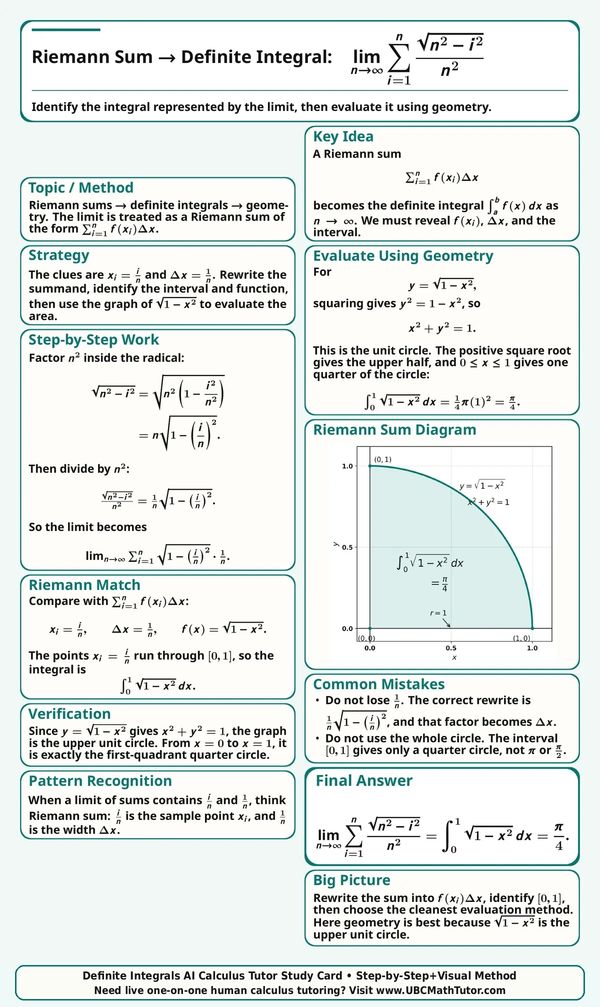
Riemann Sum to Definite Integral Study Card
This AI Calculus Solver study card shows how to express a Riemann sum limit as a definite integral. It explains how to identify Δx, right endpoints, the interval [0,1], the function f(x)=√x, and the final integral form using a clear step-by-step Calculus 2 setup with a visual Riemann sum diagram.
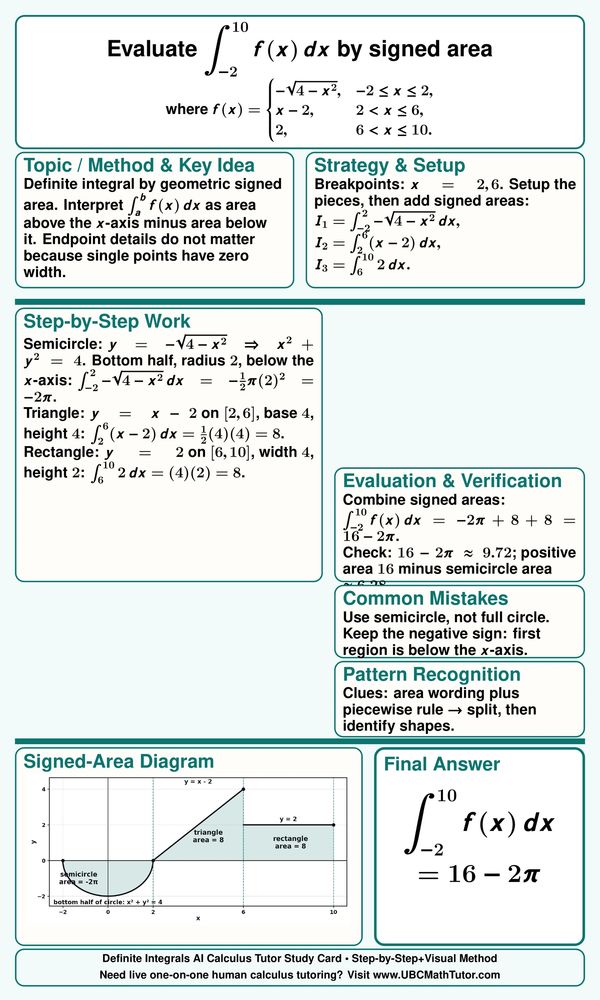
Piecewise Definite Integral by Signed Area
This AI Calculus Solver study card shows how to evaluate a piecewise definite integral by splitting the integral over separate intervals and using signed areas instead of antiderivatives. It guides students through recognizing the geometry of semicircle, triangle, and rectangle, then adding positive and negative signed areas to evaluate the definite integral with a visual diagram.

Hard Riemann Sum to Definite Integral Study Card
This AI Calculus Homework Helper study card shows how a harder Riemann sum can be transformed into a definite integral by identifying the width, interval, sample points, and logarithmic function. It is a useful step-by-step example for students learning definite integrals and exam-style Calculus 2 problem-solving.
FTC with Variable Limits Study Card
This ChatGPT Calculus Solver Study Card shows how to find the derivative of an integral with variable limits. It uses the Fundamental Theorem of Calculus, the Chain Rule, and the upper-minus-lower rule to build a clear step-by-step solution for a Calculus 2 problem.
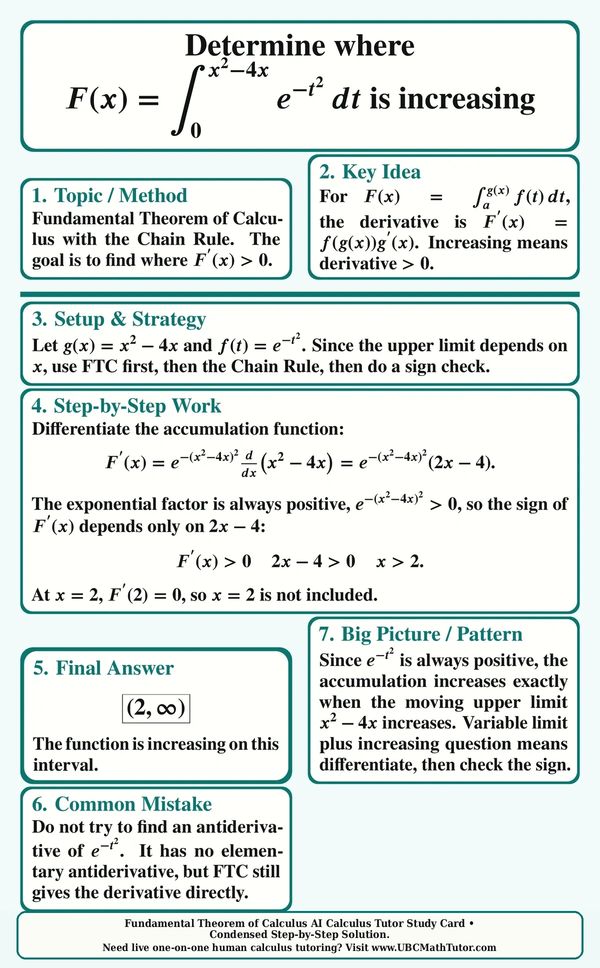
FTC Increasing Function Study Card
Based on Reza’s Calculus 2 PDF notes, this AI Calculus Solver study card shows how to determine where an accumulation function is increasing using the Fundamental Theorem of Calculus and the Chain Rule. It is a clear step-by-step example for students learning variable-limit integrals, derivatives, and sign checks in Calculus 2.
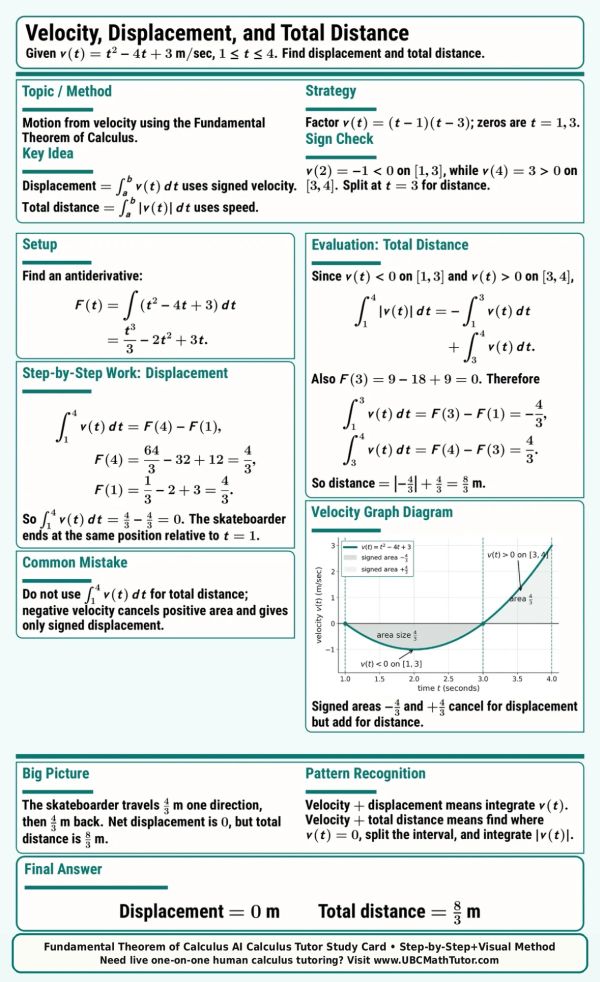
Displacement vs Distance Calculus Study Card
This ChatGPT Calculus Solver study card shows how to find displacement and total distance from a velocity function using the Fundamental Theorem of Calculus. It guides students through sign checking, splitting the interval where velocity changes sign, and evaluating both signed displacement and total distance step by step. A labeled velocity graph helps connect the integrals to motion and signed area.

U-Sub-Trig-Integral- Definite Integral Study Card
This AI Integral Solver study card shows how to evaluate a definite trigonometric integral by rewriting tan x as sin x over cos x and then using u-substitution. It highlights the key pattern behind the method and uses special triangles to find the exact trig values to evaluate the definite integral.

U-Substitution Definite Integral Study Card
This AI Integral Solver study card is based on an example from Reza’s Calculus 2 PDF notes and shows how to evaluate a definite integral using u-substitution. It walks through choosing the inside expression, changing the limits, replacing the differential factor, evaluating the new integral, and checking the answer step by step.
Theory and Pattern Recognition U-Substitution Problem
Based on an example from Reza’s Calculus 2 PDF notes, this AI Calculus Solver study card explains a theory-style u-substitution question where students use the structure of a given integral instead of finding an antiderivative. It emphasizes pattern recognition, changing limits, matching the transformed integral, and using the given information correctly.
Hard U-Substitution Study Card: Evaluate an Integral Using Two Substitutions
This ChatGPT Calculus solver study card shows a harder u-substitution problem that requires two substitutions to evaluate the integral. It emphasizes pattern recognition: when 4 − x² and √(4 − x²) appear together with x dx, a strong first step is u = 4 − x², followed by a second substitution to remove the square root. This example is adapted from Reza’s Calculus 2 PDF notes and is useful for students practicing advanced u-substitution, algebraic simplification, and logarithmic antiderivatives.
Reza's AI Math Tutor Study Cards Gallery 2
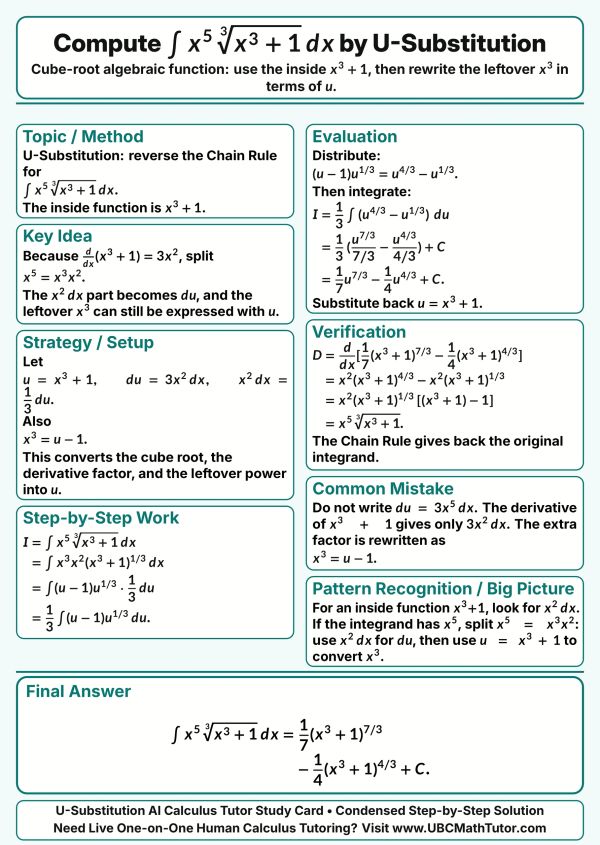
U-Sub. Cube Root Algebraic Function
This ChatGPT Calculus solver study card shows how to solve an algebraic cube-root integral using u-substitution. It helps students recognize the inside function, split the leftover power correctly, rewrite the integral in terms of the new variable U, and compute the simplified integral using the power rule.

Odd Function Symmetric Interval Definite Integral
This AI Math Solver study card shows how to evaluate a definite integral using odd-function symmetry over a symmetric interval. It explains how to check the symmetry of the integrand, avoid unnecessary antiderivatives, and use a signed-area diagram to see why the positive and negative areas cancel.
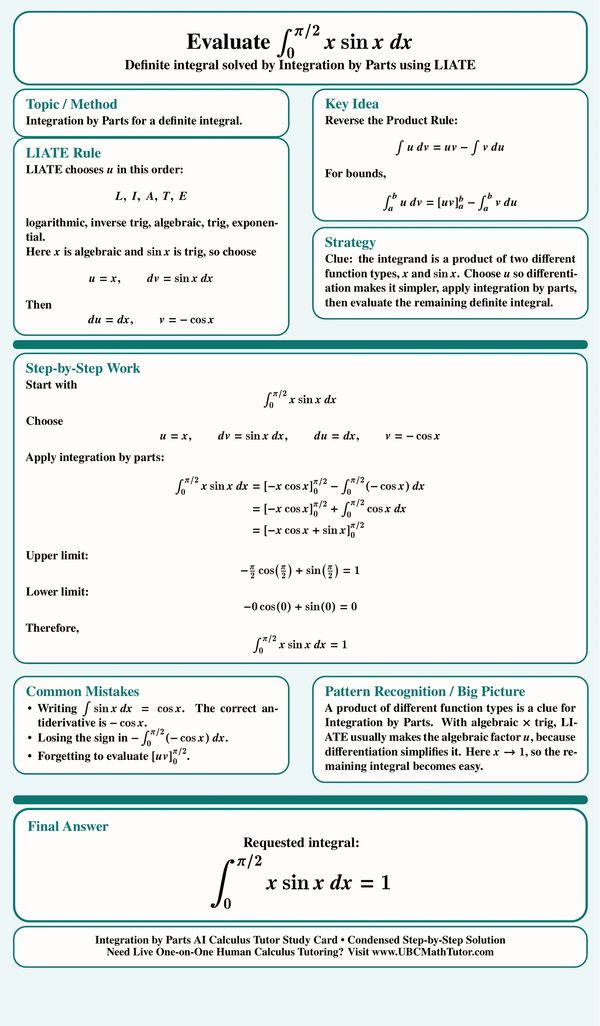
Integration by Parts Definite Integral Using LIATE
This AI Math Solver study card shows how to evaluate a definite integral using Integration by Parts and the LIATE rule. It guides students through choosing the right u and dv, applying the definite integration by parts formula, evaluating the bounds, and avoiding common sign and antiderivative mistakes.

Evaluate the Definite Integral of (Lnx)^(2) from 1 to e by Integration by Parts
This AI Calc 2 tutor study card shows how to evaluate a definite integral involving a power of natural logarithm using Integration by Parts. It helps students recognize the pattern that powers of lnx such as (Lnx)^n are strong clues for repeated integration by parts, and it walks through the setup, evaluation, common mistakes, and final answer in a clear step-by-step format.

Inverse Sine Definite Integral by Integration by Parts
This MathGPT Solver study card shows how to evaluate a definite integral involving inverse sine using Integration by Parts. It helps students choose the inverse trig expression as u, simplify the remaining radical integral, use a special triangle for exact values, and avoid confusing inverse sine with a reciprocal.
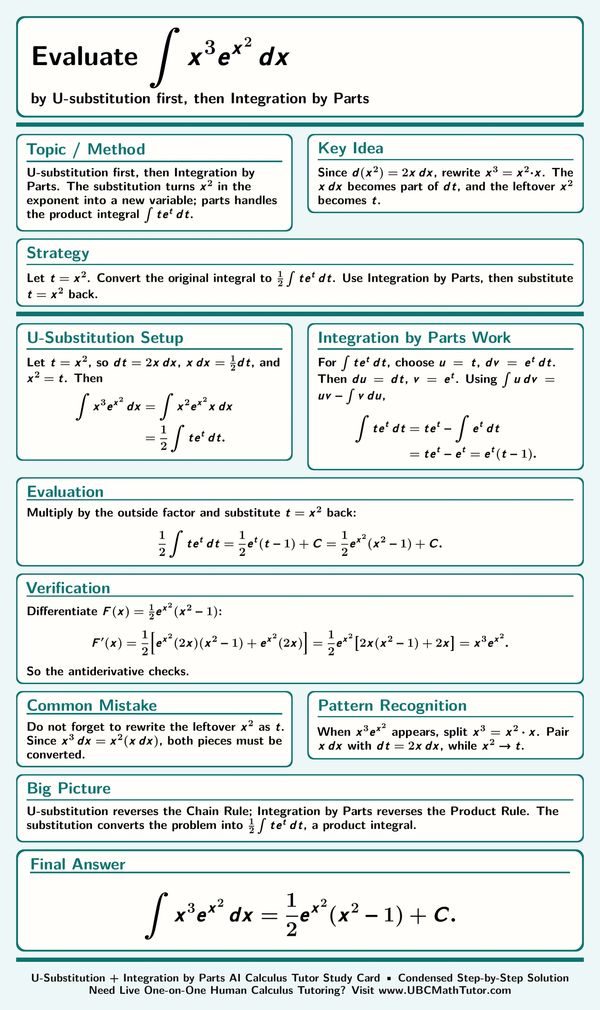
U-Substitution First, Then Integration by Parts
This AI Calculus Solver study card shows how to solve an integral that requires u-substitution first and then Integration by Parts. It helps students split the power of x correctly, use the derivative of the inside expression, transform the integral into a product, and verify the final antiderivative.
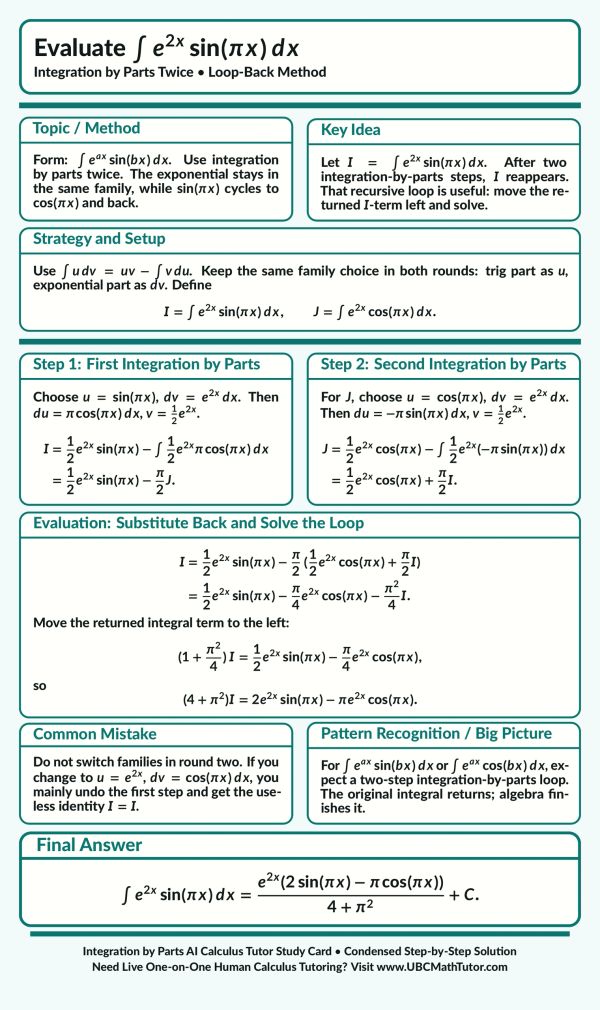
Integration by Parts Twice with Loop-Back Method
This AI Calc 2 tutor study card shows how to evaluate an exponential times sine integral using Integration by Parts twice. It helps students recognize the loop-back pattern, keep the trig and exponential choices consistent, move the returned integral to one side of the equation, and solve algebraically.
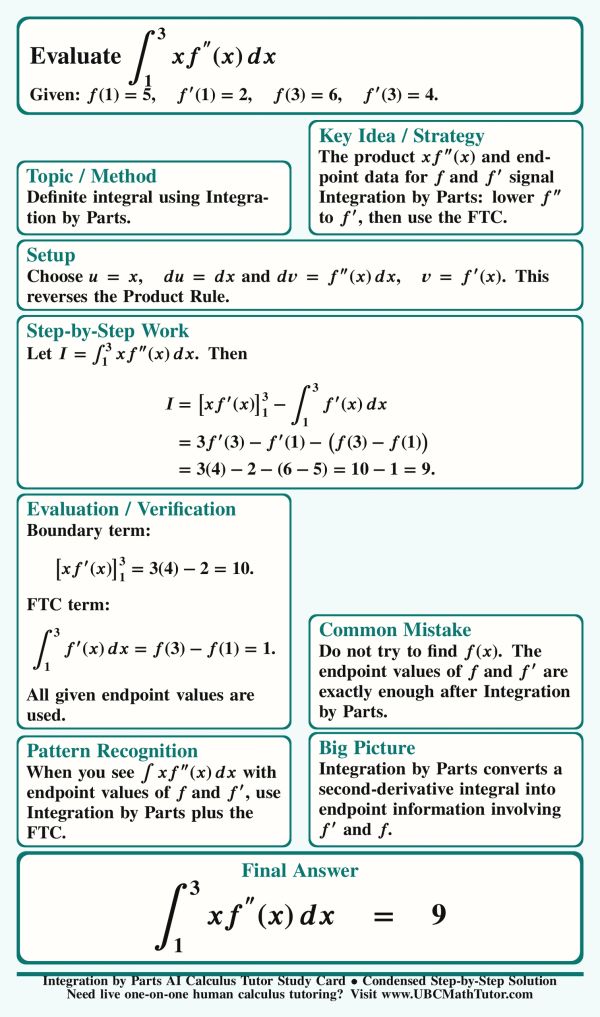
Integration by Parts Theory Question with Endpoint Values
This AI Math Solver study card shows how to evaluate an Integration by Parts theory question using endpoint values instead of finding the original function. It guides students through integrating a second-derivative function f''(x), applying the Fundamental Theorem of Calculus, and using only the given values to evaluate the definite integral.

Sine Power Reduction Formula by Integration by Parts
This AI Calculus Solver study card shows how to prove a sine-power reduction formula using Integration by Parts and then apply it to a sixth-power sine integral. It helps students understand how the formula reduces the power by two, avoid sign mistakes, and use the result as a reusable integration tool.

Integration by Parts Twice with Polynomial and Sine
This AI Integral Solver study card shows how to evaluate a polynomial times sine integral using Integration by Parts twice. The strategy is to use LIATE to choose the polynomial as u, track the chain-rule factor from the trig antiderivative, reduce the polynomial step by step, and solve for the integral.

U-Substitution First, Then Integration by Parts
This AI Calculus Solver study card shows how to evaluate an integral with a radical in the exponent by using u-substitution first and then Integration by Parts. It explains how to remove the square root from the exponent, transform the problem into an algebraic-exponential product, apply Integration by Parts, and substitute back clearly.

Factoring a Logarithm Before Integration by Parts
This Calc 2 GPT tutor study card explains how to integrate the logarithm of a factorable quadratic by factoring first, using logarithm rules, and then applying Integration by Parts to each logarithmic piece. The key idea is to turn one difficult logarithm into simpler linear log terms that can be integrated and recombined.
Reza's AI Calculus Solver Study Card Gallery 3

AI Calculus 2 Tutor: tricky U-Substitution leading to arctangent form
This AI Calc 2 Solver study card explains how to choose the best u-substitution for an integral with x over one plus x to the fourth. The key is rewriting the fourth power as a square so the integral becomes an arctangent form, instead of choosing a substitution that does not match the numerator.
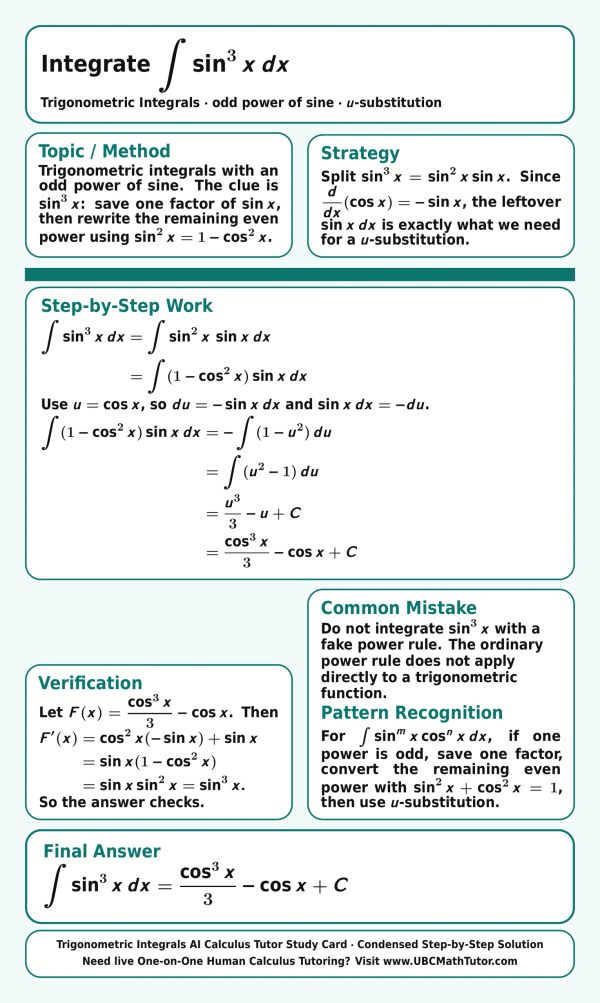
Odd Power of Sine Trig Integral
This AI Calculus 2 Solver study card explains how to integrate an odd power of sine by saving one sine factor and rewriting the remaining even power with a trig identity. The cosine substitution turns the problem into a polynomial integral, making the antiderivative much easier to find.
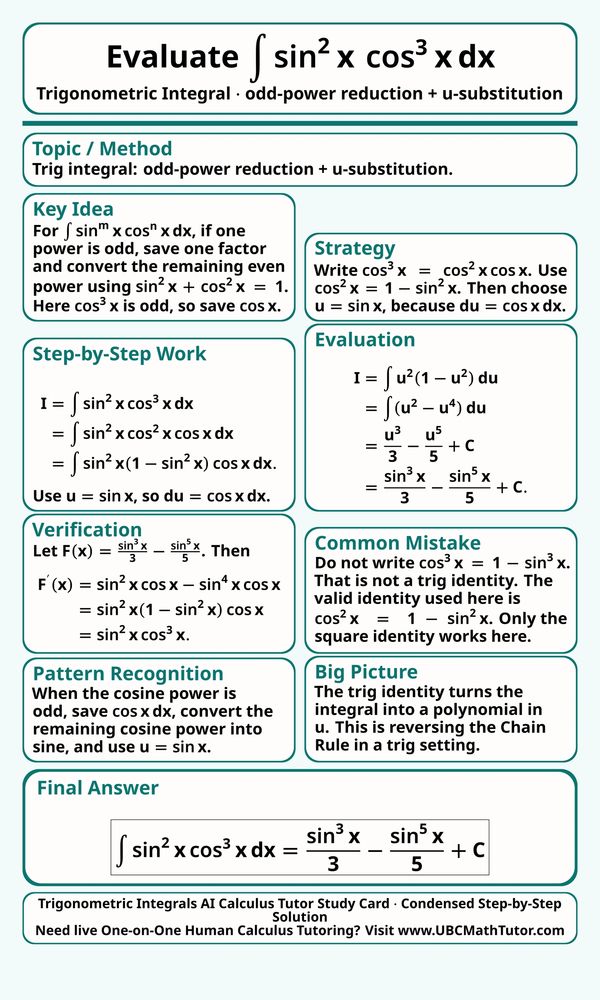
Odd Power of Cosine Trig Integral
This AI Calc 2 tutor study card explains how to integrate a product of sine and cosine powers when the cosine power is odd. The method saves one cosine factor, rewrites the remaining cosine power using a trig identity, and then uses u-substitution to turn the integral into a polynomial.
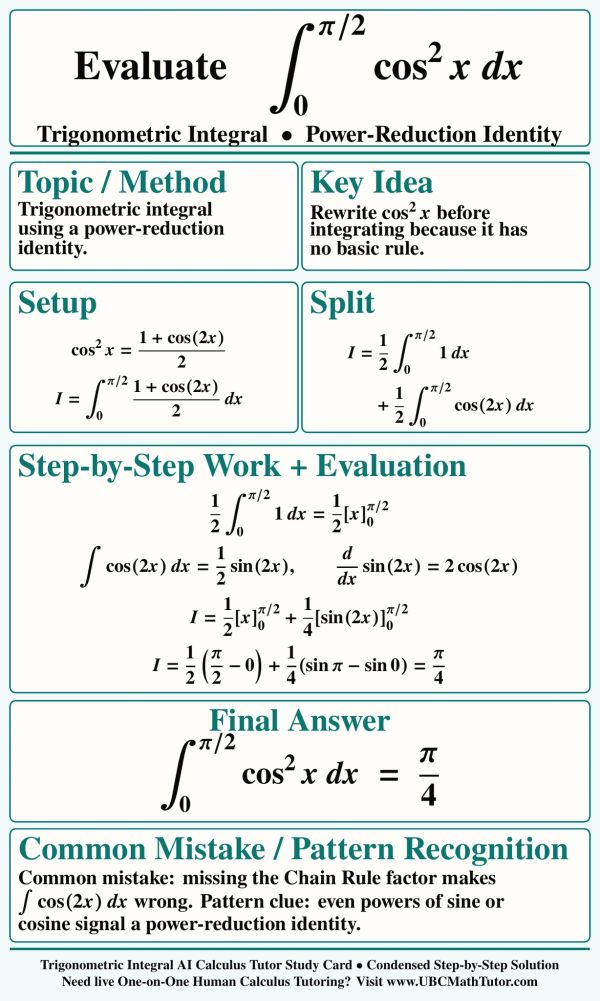
Cosine Squared Definite Integral Using Power Reduction
This AI Math Solver study card explains how to evaluate a definite trig integral with cosine squared by using the power-reduction identity. The method rewrites the even power before integrating, splits the integral into simple pieces, and tracks the Chain Rule factor for the double-angle cosine term.
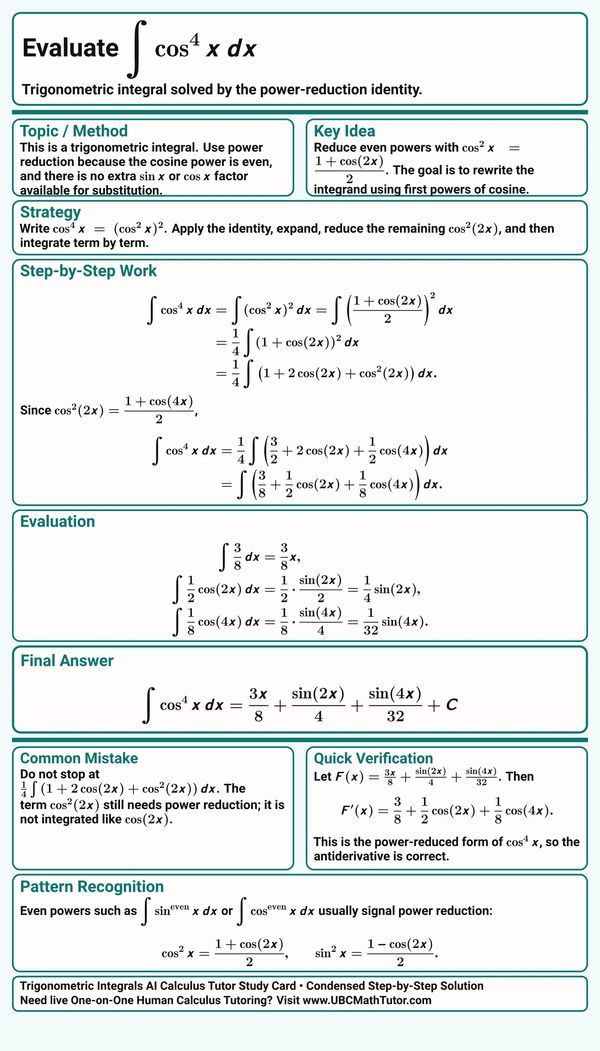
Cosine Fourth Power Trig Integral
This Calculus Solver study card explains how to integrate cosine to the fourth power using power-reduction identities. The solution reduces the even power step by step, expands the expression into integrable cosine terms, and finishes with a quick check that the antiderivative matches the reduced form.
Tangent and Secant Trig Integral Using U-Substitution
This Calc 2 GPT tutor study card explains how to integrate a tangent-secant product when the secant power is even. The key move is saving one secant squared factor for u-substitution, rewriting the remaining secant powers in terms of tangent, and turning the integral into a polynomial.
Odd Tangent Power Trig Integral
This MathGPT Solver study card explains how to integrate a tangent-secant product when the tangent power is odd. The key move is saving one tangent-secant factor for u-substitution, converting the remaining tangent power into secant, and turning the integral into a polynomial in secant.
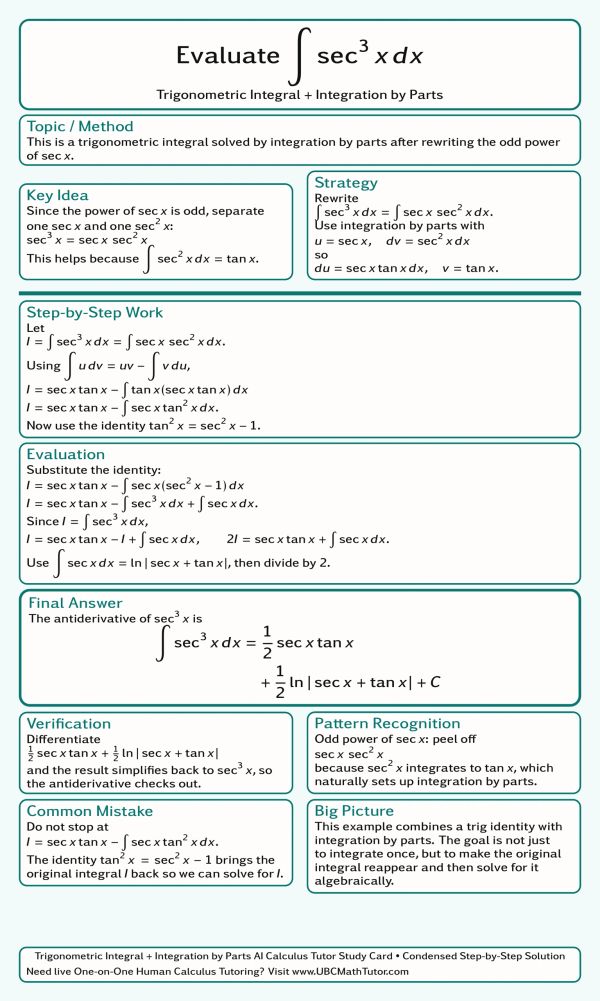
Secant Cubed Integral by Integration by Parts
This AI Calculus Solver study card explains how to integrate secant cubed by combining a trig identity with Integration by Parts. The main idea is to split off secant squared, let the original integral return, and then solve algebraically after using the known antiderivative of secant.

Half-Angle Identity Trig Integral
This Calculus GPT Solver study card explains how to evaluate a trig integral with a square root by using a half-angle identity. The important step is rewriting the expression under the radical, checking the interval before removing the absolute value, and then integrating the simplified sine expression.

Cotangent and Cosecant Definite Trig Integral
This MathGPT Solver study card explains how to evaluate a definite trig integral involving cotangent and cosecant powers. The method saves the correct cotangent-cosecant factor for u-substitution, rewrites the remaining cotangent power in terms of cosecant, changes the bounds carefully, and tracks the negative sign.
Tangent Over Square Root Secant Trig Integral
This Calculus GPT Solver study card explains how to evaluate a trig integral with tangent cubed over the square root of secant. The solution rewrites the integrand in sine and cosine, saves the right sine factor for u-substitution, simplifies the powers carefully, and verifies the final antiderivative.

Product-to-Sum Trig Integral Study Card
This Calculus GPT Solver study card explains how to integrate a product of sine and cosine with different angles using a product-to-sum identity. The method turns the product into simpler sine terms, integrates each term separately, and uses even-function symmetry for cosine to simplify the final answer.
AI Calculus GPT Tutor Study Card Gallery 4
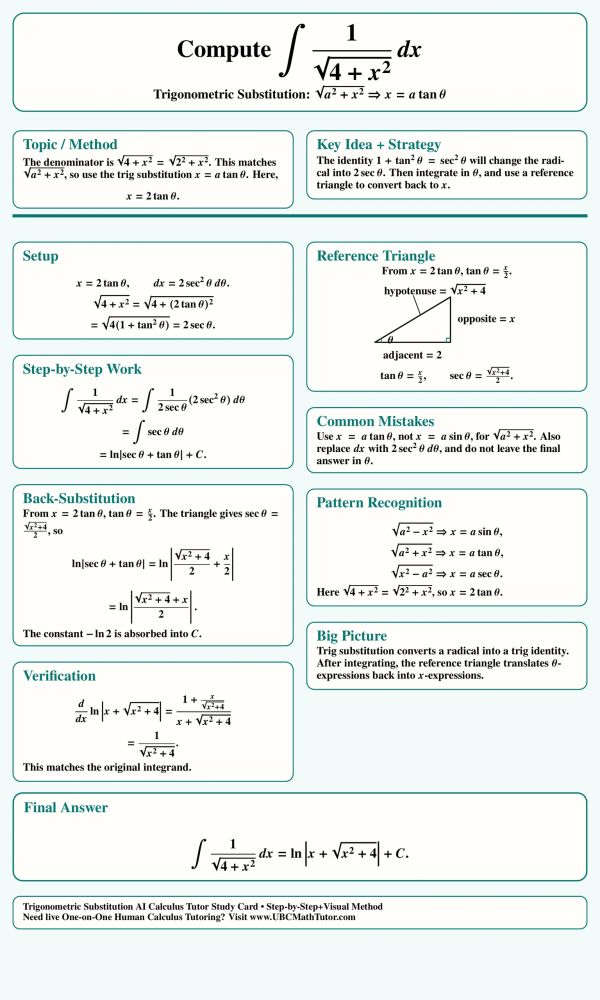
Trig Substitution: Tangent Pattern Example
This AI Calculus tutor study card explains how to evaluate an integral with the square root of 4 plus x squared using trigonometric substitution. The method recognizes the square root of a squared plus x squared pattern, uses a tangent substitution, simplifies the radical, and then converts the answer back to x with a reference triangle.
Trig Substitution: Sine Pattern Example Card
This ChatGPT Math Solver study card explains how to integrate the square root of 4 minus x squared using trigonometric substitution. The solution uses the square root of a squared minus x squared pattern, changes variables with a sine substitution, applies a power-reduction identity, and converts the result back to x with a reference triangle.
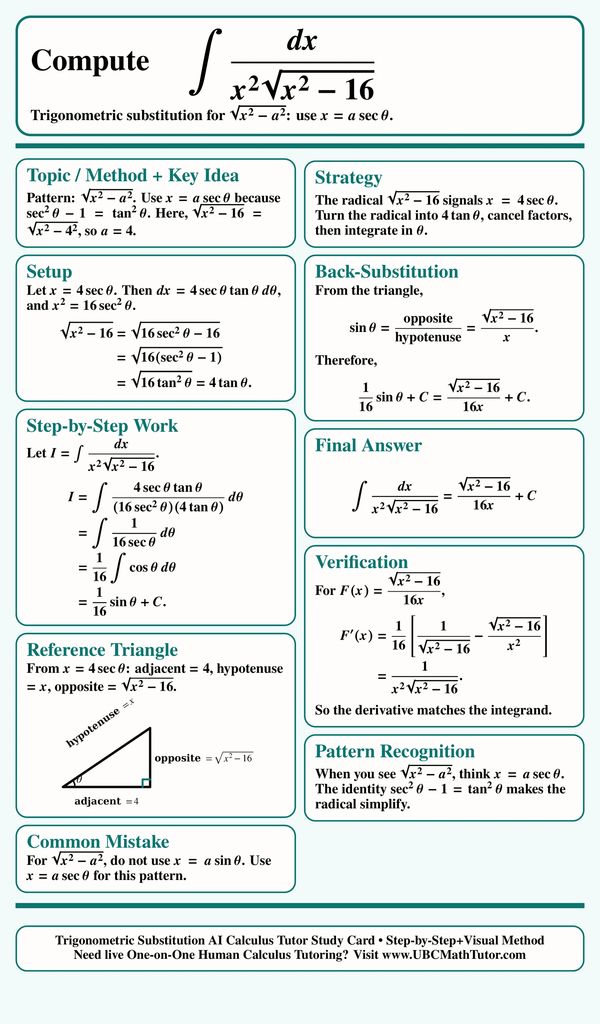
Trig Substitution: Secant Pattern Example
This AI Calculus Solver study card explains how to evaluate an integral with the square root of x squared minus 16 using trigonometric substitution. The key is recognizing the square root of x squared minus a squared pattern, choosing a secant substitution, simplifying the radical, and using a reference triangle to return to an answer in x.

Trig Substitution Definite Integral
This MathGPT Solver study card explains how to evaluate a definite integral with x squared times a square-root radical using trigonometric substitution. The solution changes the bounds, rewrites the radical with a sine substitution, uses power-reduction identities, and finishes the integral cleanly.

Trig Substitution with a Secant Setup
This ChatGPT Math Solver study card explains how to integrate a radical expression that fits the x squared minus a squared pattern. The method uses a secant substitution, simplifies the radical into a tangent expression, uses a reference triangle for back-substitution, and verifies the final antiderivative.
Trig Substitution Definite Integral
This Step-by-Step Calc 2 AI tutor study card explains definite integrals with sum-of-squares terms. Master changing bounds, tangent substitutions, and trig identities.

Completing the Square Before Trig Substitution
This Step-by-Step Calculus GPT study card explains how to integrate a square-root expression by completing the square first. The radical becomes a shifted a-squared minus u-squared pattern, so a sine substitution removes the square root, a power-reduction identity finishes the integral, and a reference triangle helps convert the answer back to x.
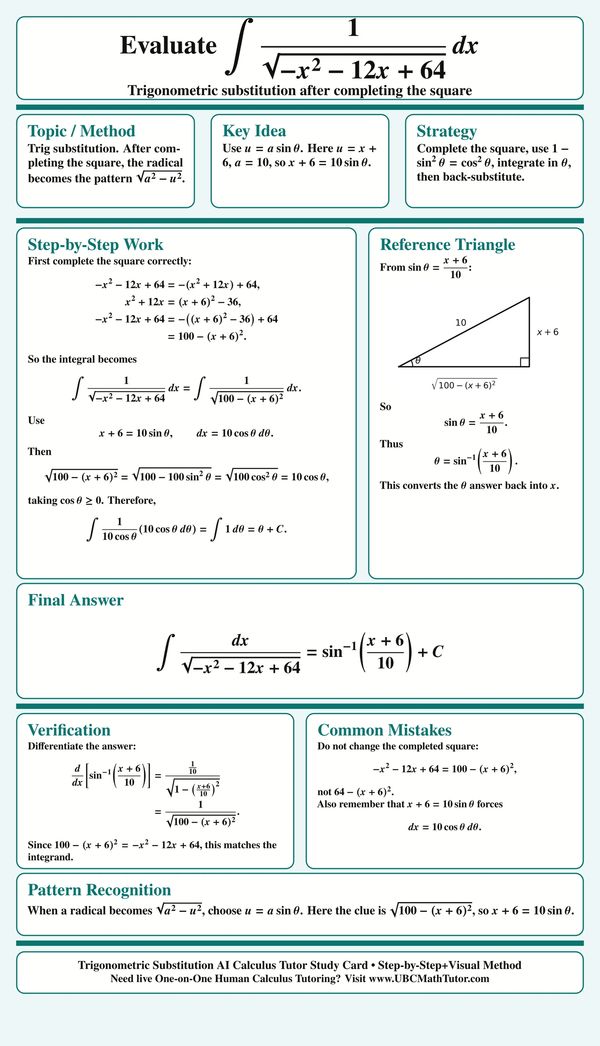
Shifted Radical Trig Substitution
This AI Calculus Homework Helper study card explains how completing the square turns a quadratic under a radical into a shifted trig-substitution pattern. The method rewrites the expression as a constant squared minus a shifted variable squared, uses a sine substitution, and converts the final angle expression back to x.
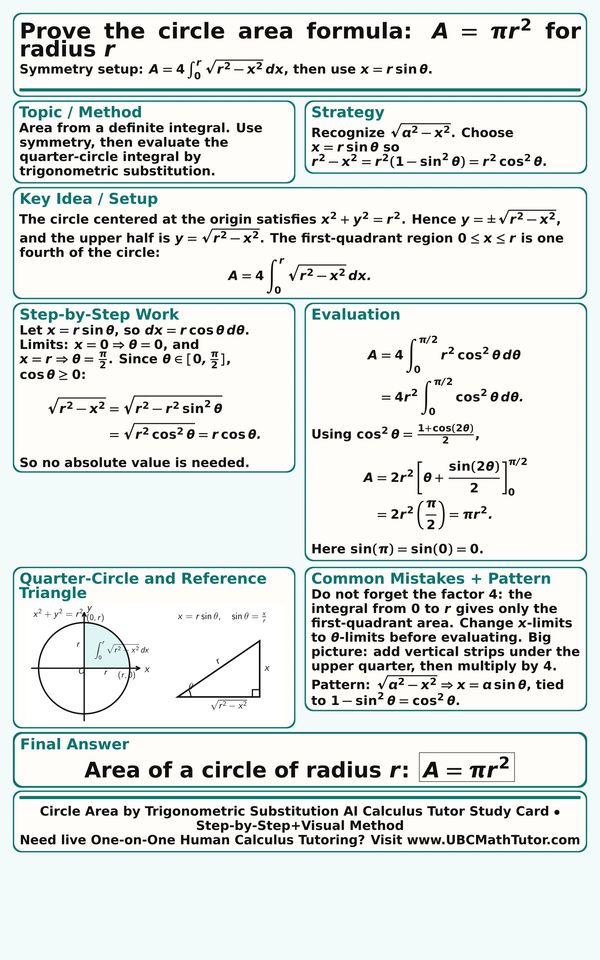
Circle Area Formula by Trig Substitution
This Step-by-Step Calc 2 GPT tutor study card explains how to derive the area formula for a circle using a definite integral and trigonometric substitution. The solution uses symmetry to work with one quarter of the circle, evaluates the square-root curve with a sine substitution, and multiplies by 4 to get the full area.

Completing the Square with Trig Substitution
This AI Calc 2 Problem solver with steps study card explains how to handle an integral where completing the square comes before trigonometric substitution. The key is rewriting the quadratic as a completed square type expression, using a sine substitution, simplifying with trig identities,solving the trig integral and then converting the answer back to x using the reference triangle.

U-Substitution First, Then Trig Substitution
This AI Calculus Homework Helper study card explains an integral that needs u-substitution first and trigonometric substitution second. The first substitution turns the radical into a familiar one minus u squared form, and the sine substitution then finishes the integral with a reference triangle and back-substitution.
U-Sub+Trig Substitution Definite Integral
Master Calculus 2 integration techniques with Reza's Calc 2 AI Solver. This study card provides a step-by-step breakdown of U-substitution followed by trigonometric substitution of a definite integral.
Reza's AI Calculus Tutor Study Card Gallery 5

Partial Fractions with Distinct Linear Factors
This AI Calculus Solver study card explains how to integrate a proper rational function using partial fractions with distinct linear factors. The denominator is already factored, so the method sets up one constant over each factor, solves the coefficients by substitution, and integrates the resulting logarithmic terms.

Partial Fractions with a Repeated Factor
This AI Integral Solver study card focuses on a partial fractions integral where the denominator has a repeated linear factor. The solution factors the denominator first, includes one fraction for each power of the repeated factor, matches coefficients, and integrates the simplified rational pieces.
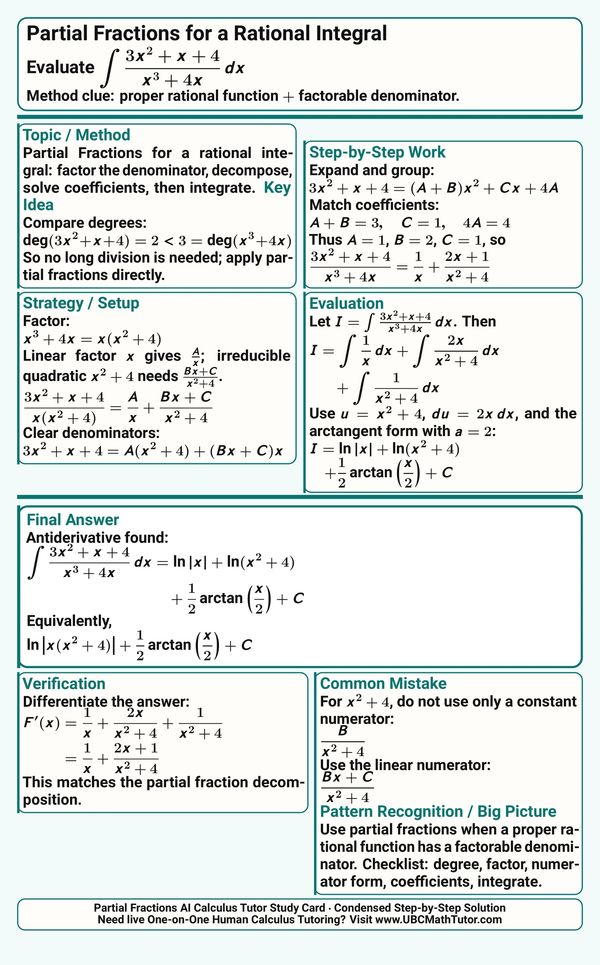
Partial Fractions with an Irreducible Quadratic
This AI Calc 2 GPT tutor study card walks through a partial fractions integral with both a linear factor and an irreducible quadratic factor. The key step is using a linear numerator over the quadratic piece, then integrating the result into logarithm and arctangent terms.
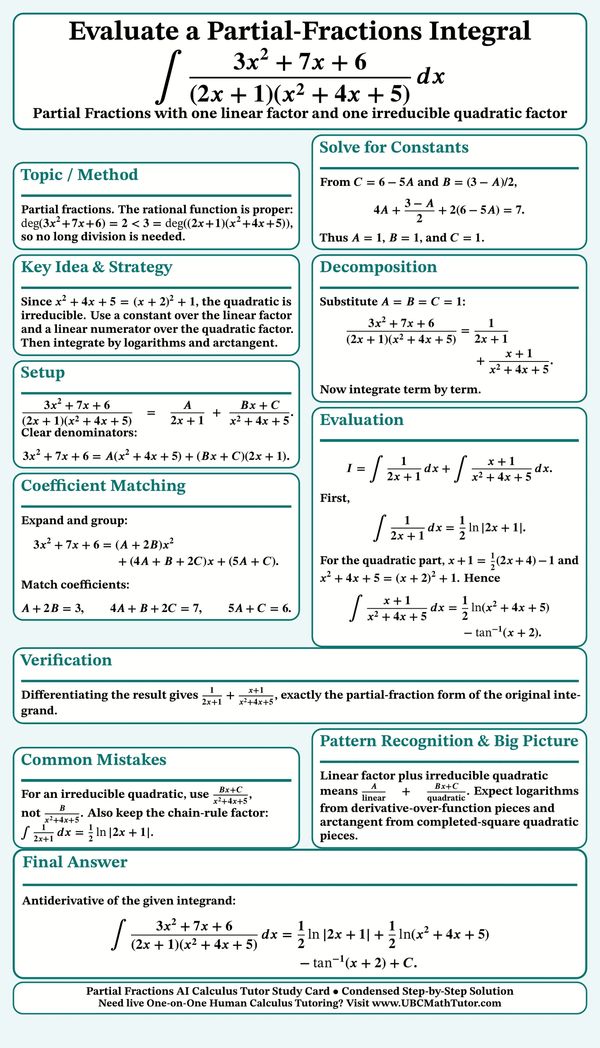
Partial Fractions with Linear and Quadratic Factors
This Integral Solver study card explains how to integrate a rational function with one linear factor and one irreducible quadratic factor. The method uses a constant numerator over the linear factor, a linear numerator over the quadratic factor, coefficient matching, and then logarithm and arctangent integration.
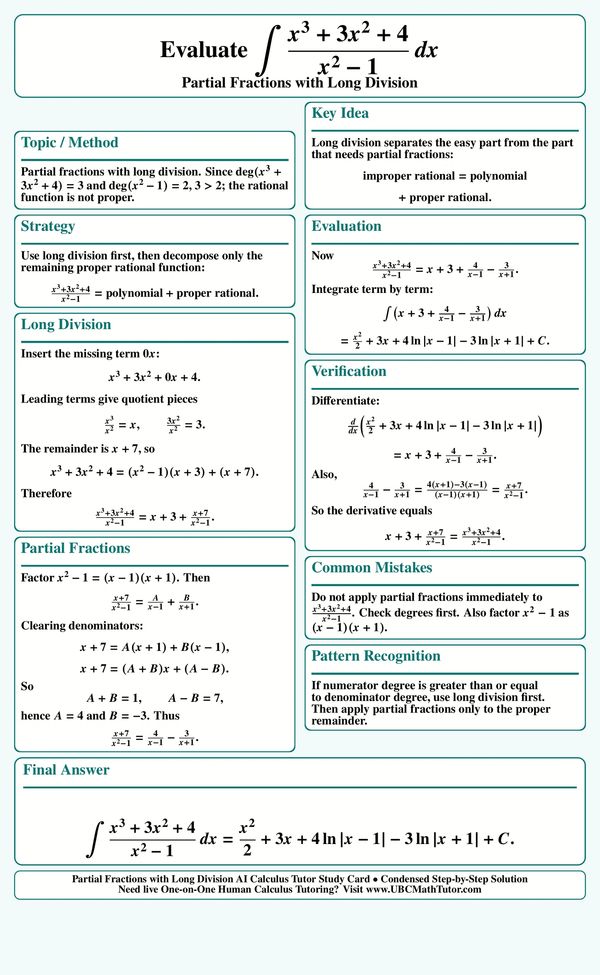
Partial Fractions After Long Division
This ChatGPT Math Solver study card shows why long division must come before partial fractions when the rational function is improper. After splitting the integrand into a polynomial part and a proper rational remainder, the remaining fraction is decomposed and integrated into logarithmic terms.
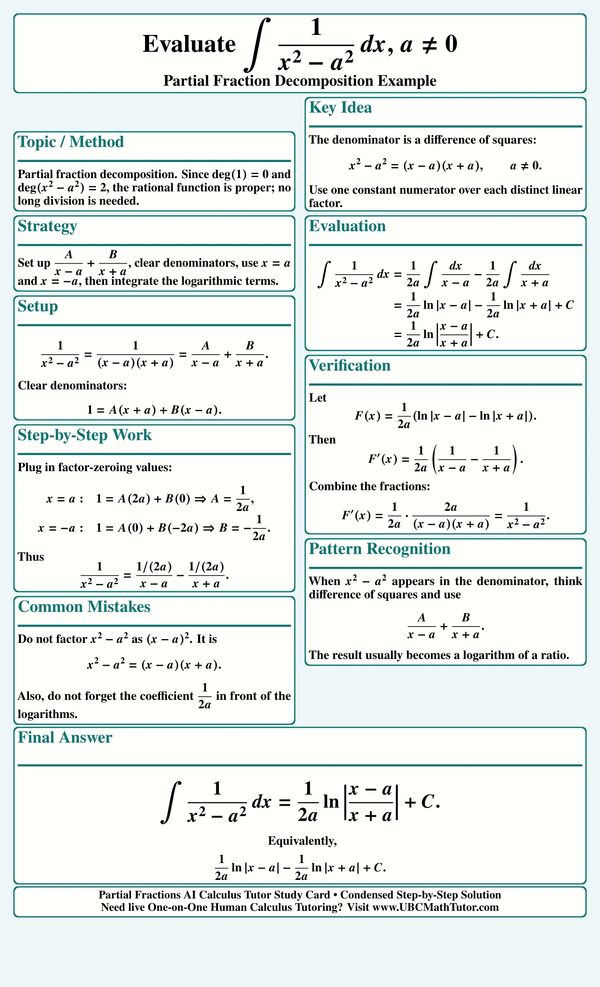
Difference of Squares Partial Fractions
This AI Calc 2 tutor study card explains the partial fraction decompositiion of 1/(x^2-a^2). The denominator factors as a difference of squares, so the integral splits into two simple logarithmic terms that combine into a logarithm of a ratio.
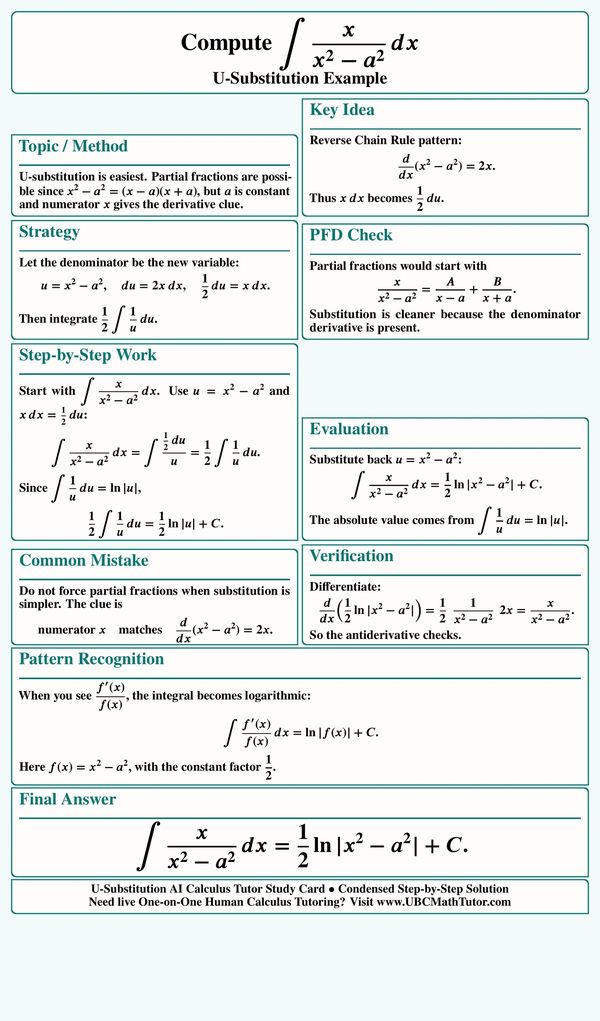
U-Substitution Logarithmic Integral
This AI Calculus Tutor study card explains how to recognize a logarithmic u-substitution pattern in a rational integral. Instead of forcing partial fractions, the method uses the denominator as the new variable, matches the numerator to the derivative, and integrates into a natural logarithm.
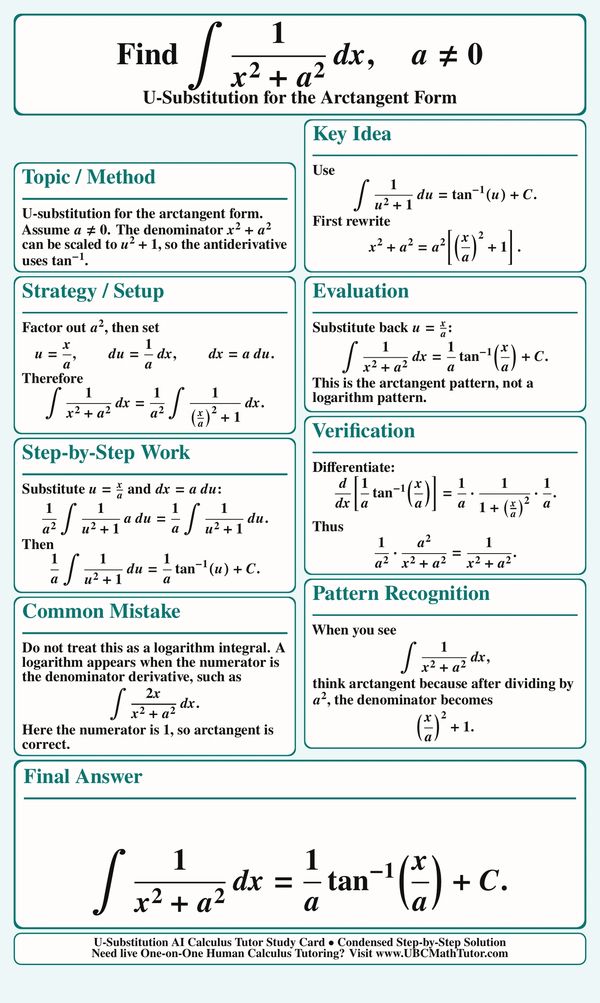
Arctangent Integral by U-Substitution
This AI Calculus Solver study card shows how to identify the arctangent form for an integral with one over x squared plus a squared. The solution scales the denominator into u squared plus 1, applies u-substitution carefully, and avoids confusing the result with a logarithm pattern.
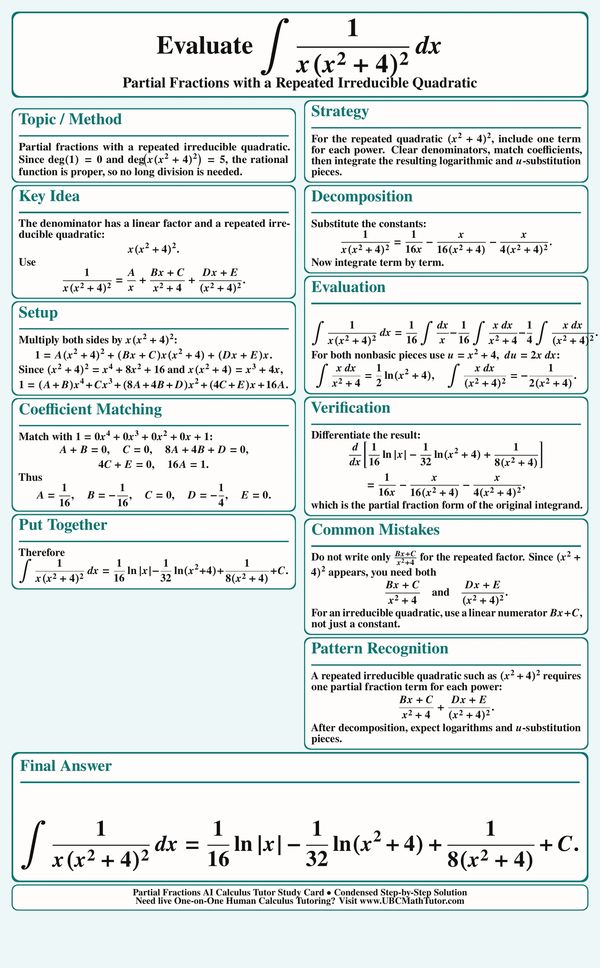
Repeated Irreducible Quadratic Partial Fractions
This AI Integral Solver study card explains how to decompose a rational integral with a linear factor and a repeated irreducible quadratic factor. The setup includes one partial fraction term for each power of the quadratic, uses linear numerators where needed, and finishes with logarithmic and u-substitution pieces.
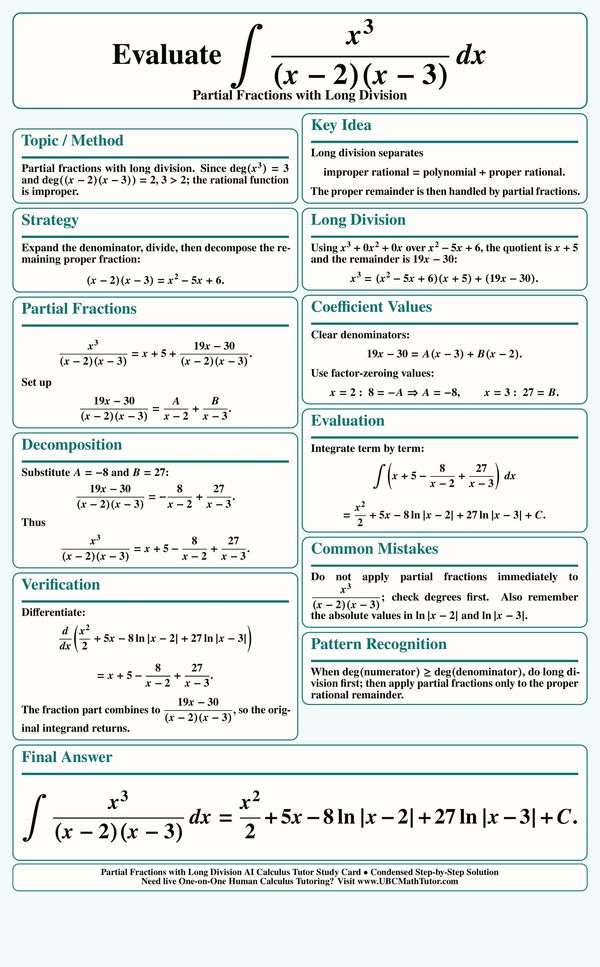
Partial Fractions with Long Division
This MathGPT Solver study card explains how to integrate an improper rational function by using polynomial long division before partial fractions. After rewriting the fraction as a polynomial plus a proper rational remainder, the remaining terms integrate into logarithms.
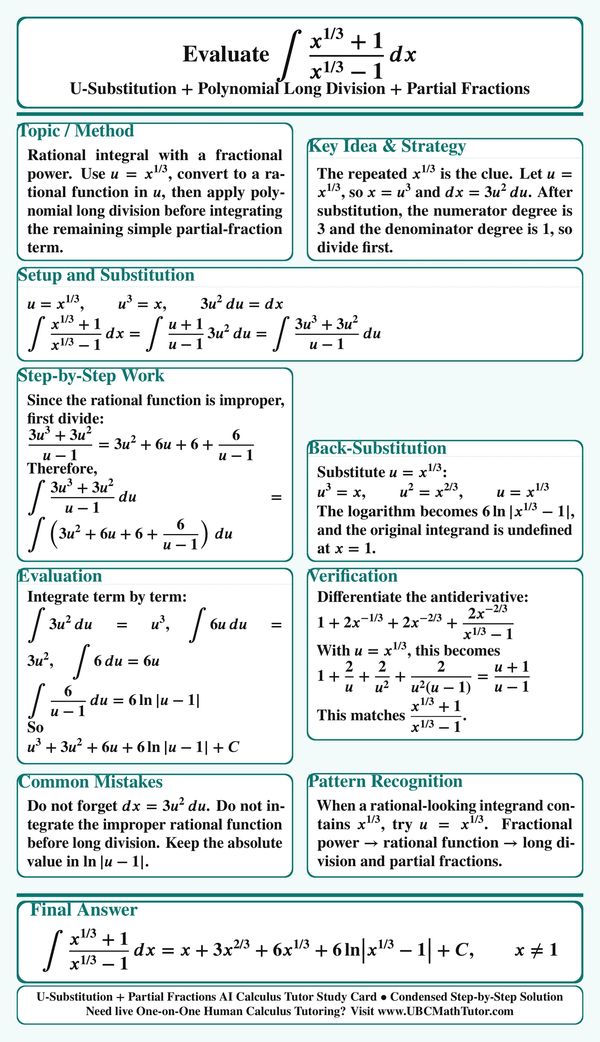
Fractional Power Integral with Long Division
This Step-by-Step Calc 2 GPT tutor study card shows how to handle a rational-looking integral with fractional powers. The method uses u-substitution to turn the expression into a rational function, applies polynomial long division, and then substitutes back to get powers of x plus a logarithmic term.
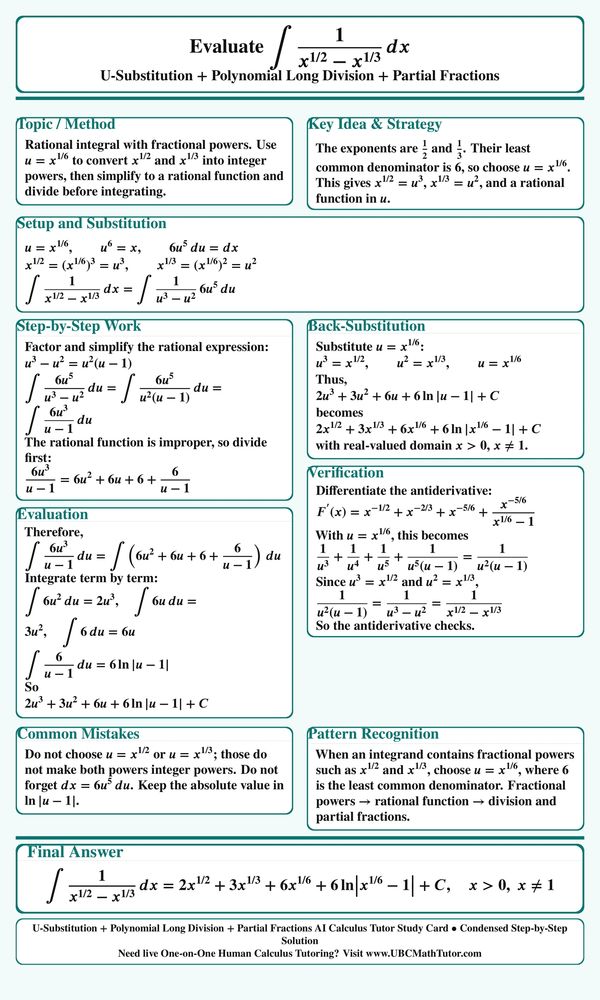
Fractional Powers Converted to a Rational Integral
This AI Integral Solver study card walks through an integral with fractional powers by choosing a substitution based on the least common denominator of the exponents. The substitution converts the problem into a rational function, making polynomial long division and partial fractions possible.
AI Calculus Tutor Study Card Gallery 6

Radical Exponential Integral with Partial Fractions
This Step-by-Step Calculus study card explains how to integrate a radical exponential expression by setting the square root of one plus e to the x equal to u. The substitution turns the problem into a rational integral, then partial fractions and back-substitution give the final antiderivative.
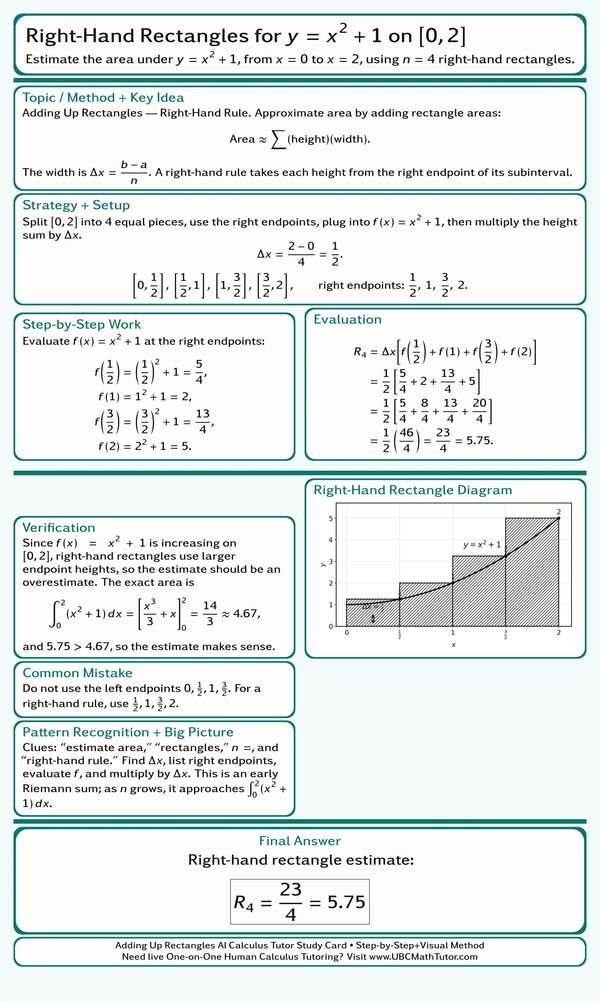
Right-Hand Rectangle Riemann Sum
This AI Calculus Solver study card explains how to estimate area under a curve using right-hand rectangles. The method splits the interval into equal subintervals, uses right endpoints for the rectangle heights, adds the areas, and compares the estimate to the exact integral.
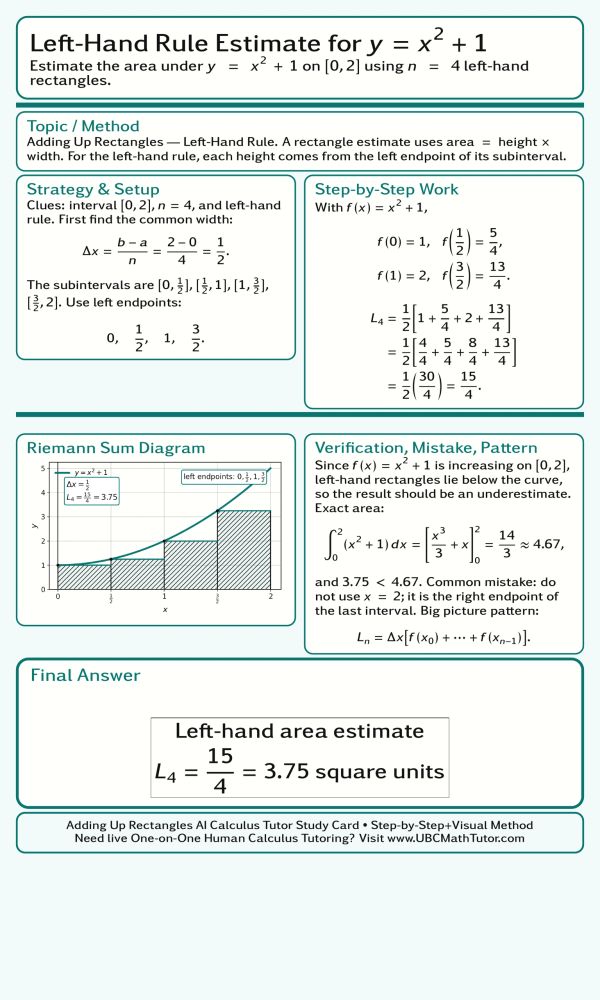
Left-Hand Rule Area Estimate
This AI Calculus Tutor study card shows how to estimate area with the left-hand rule. The solution finds the rectangle width, chooses the left endpoint of each subinterval, evaluates the function at those points, and adds the rectangle areas to form a Riemann sum.
AI Calculus Study Card Gallery 7
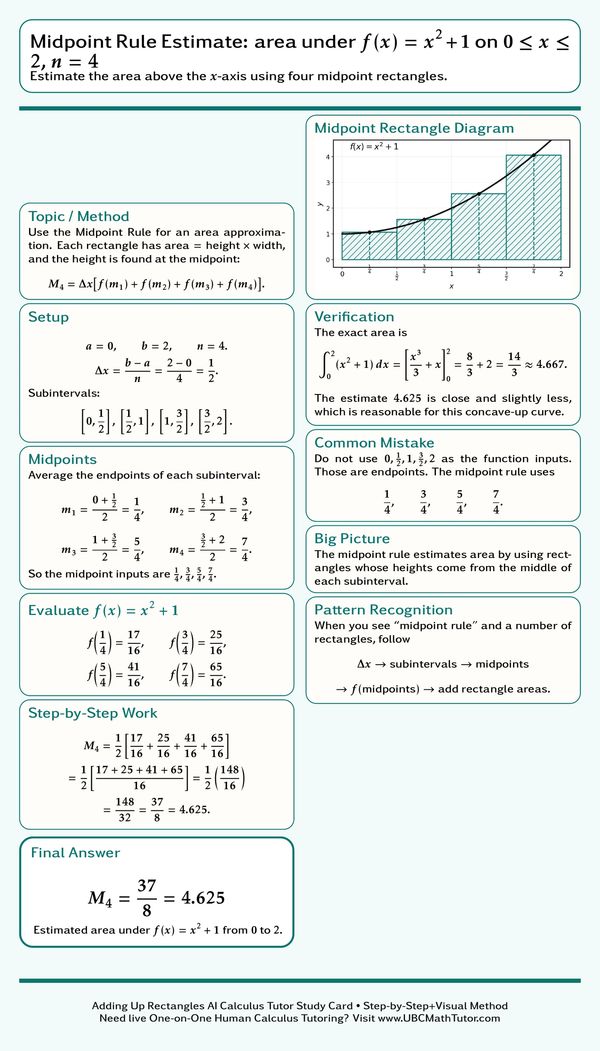
Midpoint Rule Riemann Sum
This ChatGPT Math Solver study card walks through a midpoint rule estimate for area under a curve. The method divides the interval into equal pieces, finds the midpoint of each subinterval, evaluates the function at those midpoint values, and adds the rectangle areas.
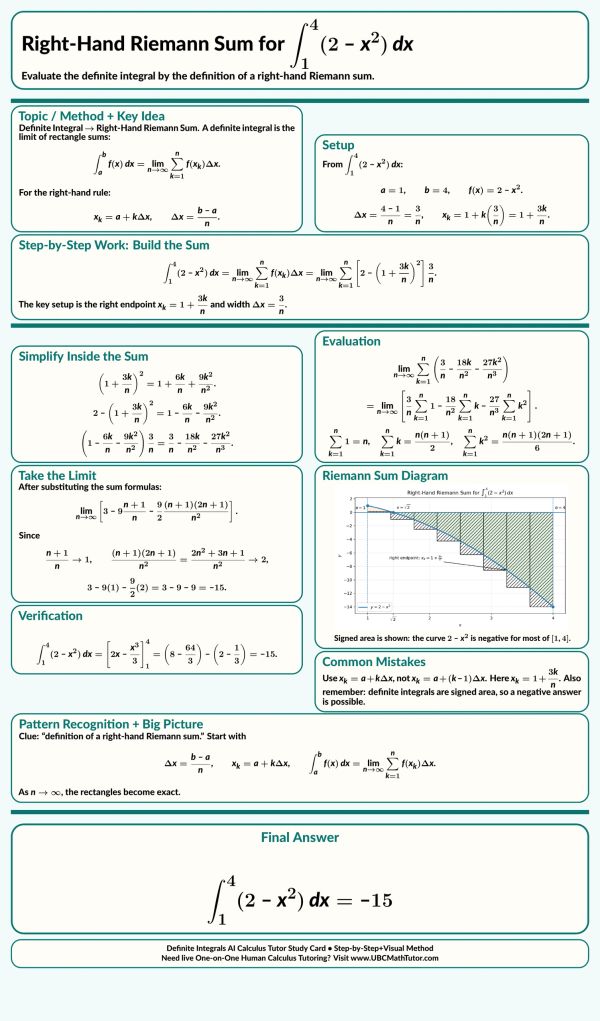
Right-Hand Riemann Sum for a Definite Integral
This AI Integral Solver study card explains how to evaluate a definite integral using the definition of a right-hand Riemann sum. The setup identifies the interval, rectangle width, and right endpoints, then simplifies the summation and takes the limit to get the exact signed area.
Definite Integral Estimate with Minimum and Maximum Bounds
This Calc 2 exam prep study card shows how to estimate a definite integral using absolute minimum and maximum bounds on a closed interval. Instead of finding an antiderivative, the method traps the area between two rectangle estimates and gives a clean upper and lower bound.
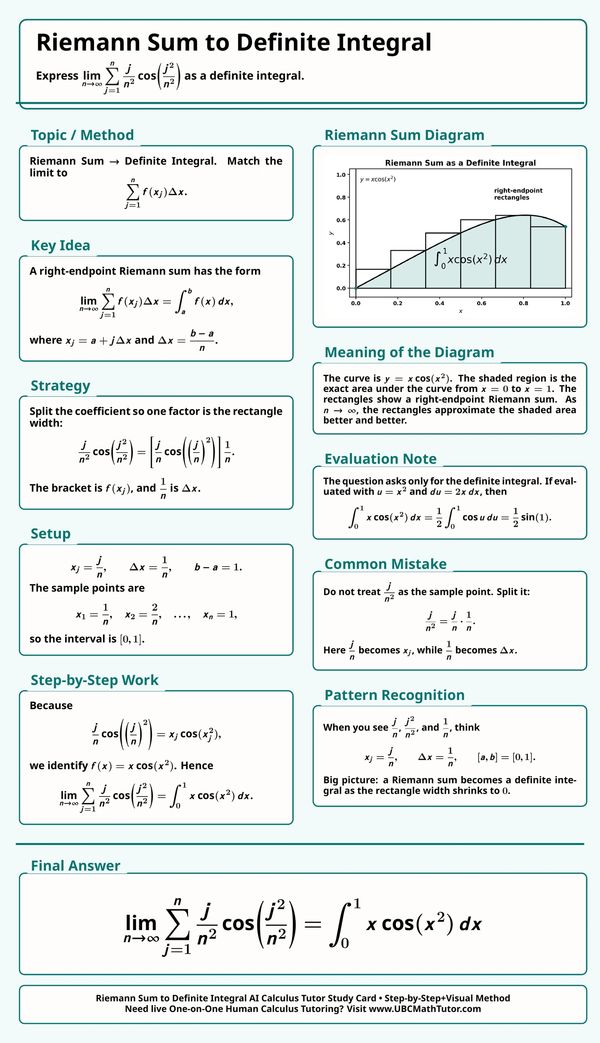
Riemann Sum to Definite Integral
This ChatGPT Calculus Solver example explains how to convert a Riemann sum into a definite integral. The key is recognizing j over n as the sample point, one over n as the rectangle width, and matching the expression to the function x times cosine of x squared on the interval from 0 to 1.
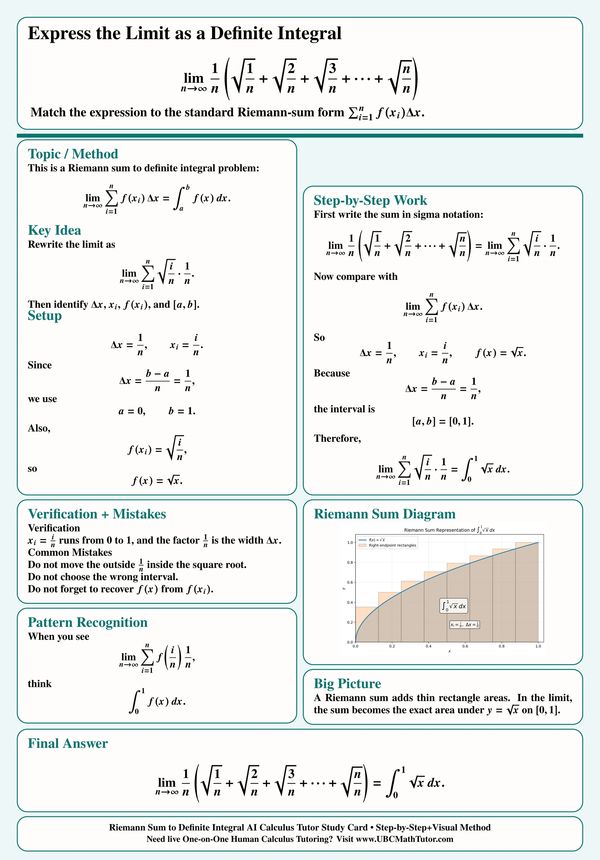
Riemann Sum Limit as a Definite Integral
This ChatGPT Integral Solver card explains how to rewrite a Riemann sum limit as a definite integral. The key is identifying one over n as the rectangle width, i over n as the sample point, and square root of x as the function on the interval from 0 to 1.
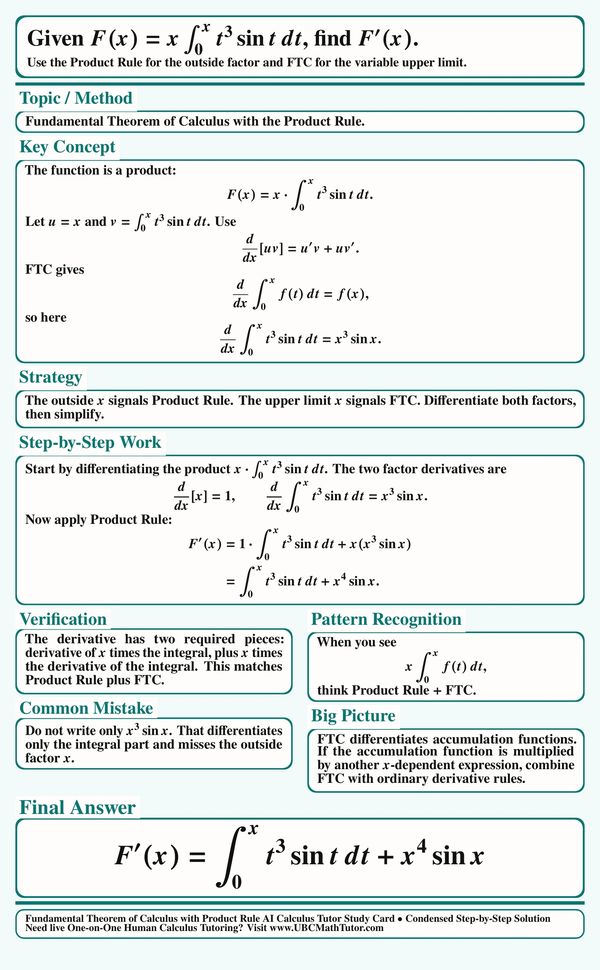
Differentiate an Integral - Product Rule and FTC
This AI Calc tutor study card explains how to differentiate a function that is x times a variable-limit integral. The solution combines the Product Rule with the Fundamental Theorem of Calculus, showing why the derivative includes both the original integral term and the new upper-limit term.
Find f(x) from an Integral Equation
This AI Calculus tutor study card explains how to solve an equation involving a variable-limit integral by differentiating both sides first. The Fundamental Theorem of Calculus reveals the hidden integrand, and substituting x equals C makes the integral vanish so the constant C can be found.
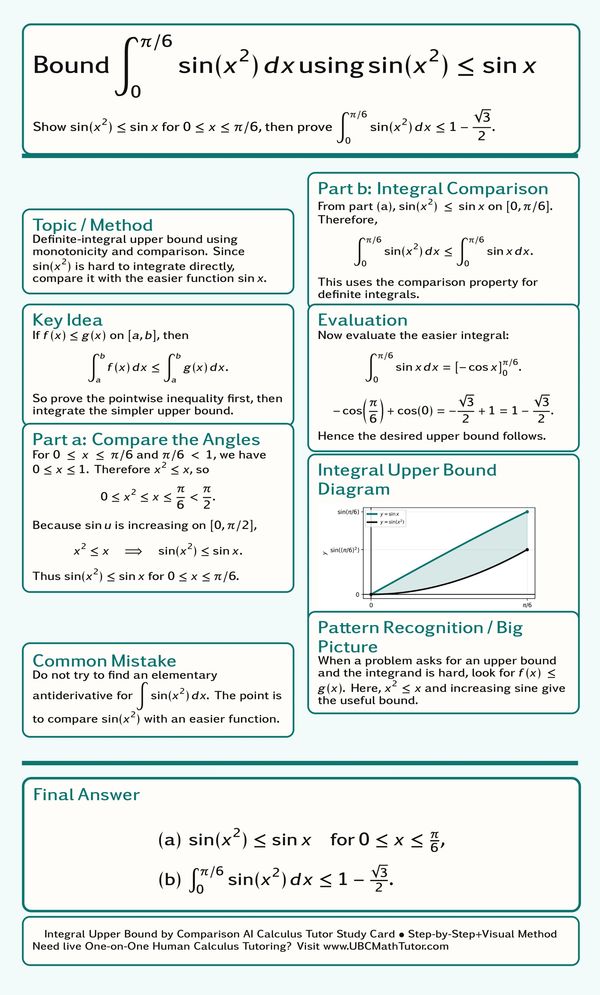
Definite Integral Upper Bound by Comparison
This Calculus GPT tutor study card explains how to estimate a definite integral by proving a pointwise inequality first. The method compares sine of x squared with sine x on the interval from zero to pi over six, then integrates the simpler function to produce a clean upper bound.
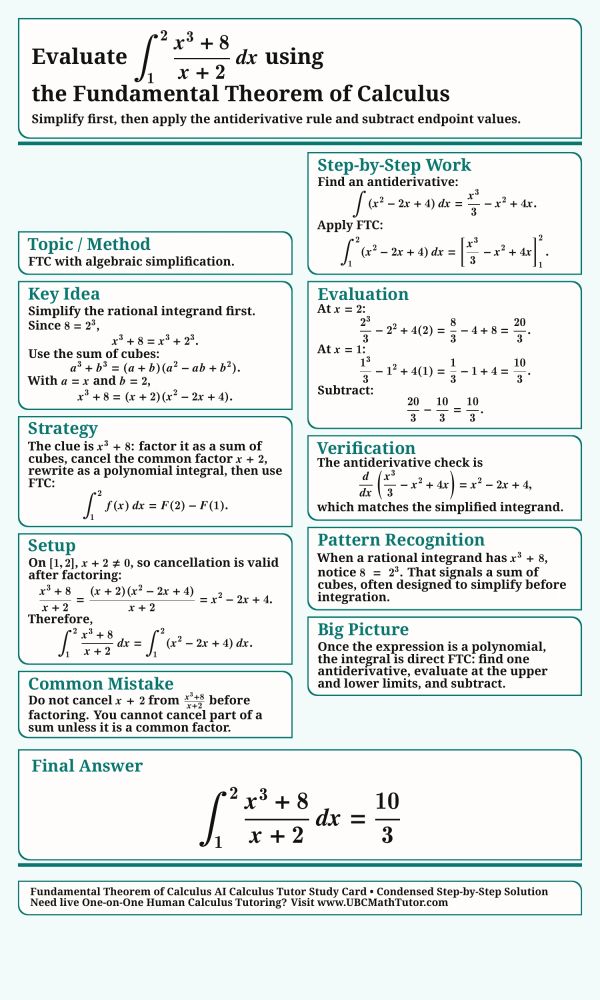
FTC Definite Integral After Algebraic Simplification
This AI Calc tutor study card explains how to evaluate a definite integral by simplifying the integrand before applying the Fundamental Theorem of Calculus. The key move is factoring the sum of cubes, canceling the common factor, integrating the resulting polynomial, and subtracting endpoint values.
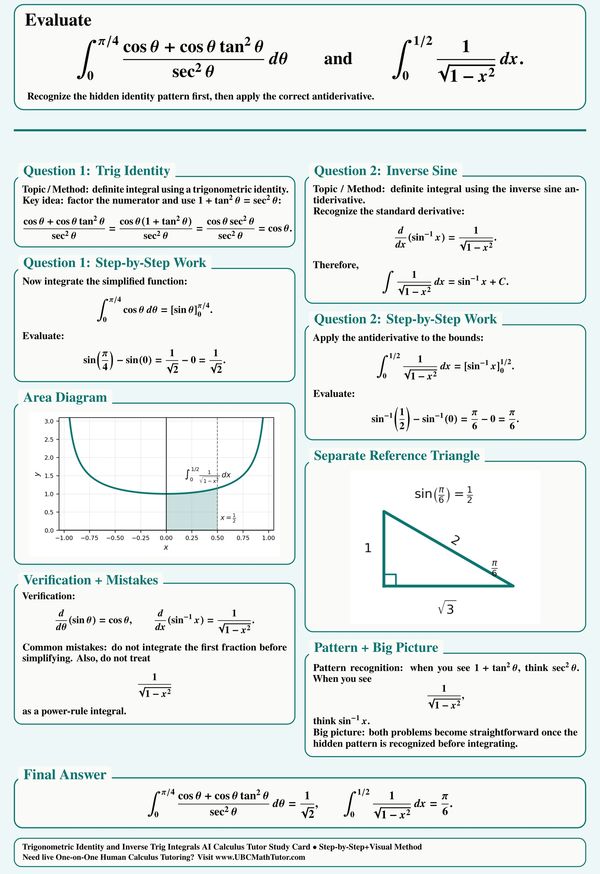
Trig Identity and Inverse Sine Definite Integrals
This AI Calculus tutor study card explains two definite integral patterns: simplifying a trig identity before integrating and recognizing the inverse sine antiderivative. The examples show how hidden identities turn difficult-looking expressions into standard FTC computations with exact values.
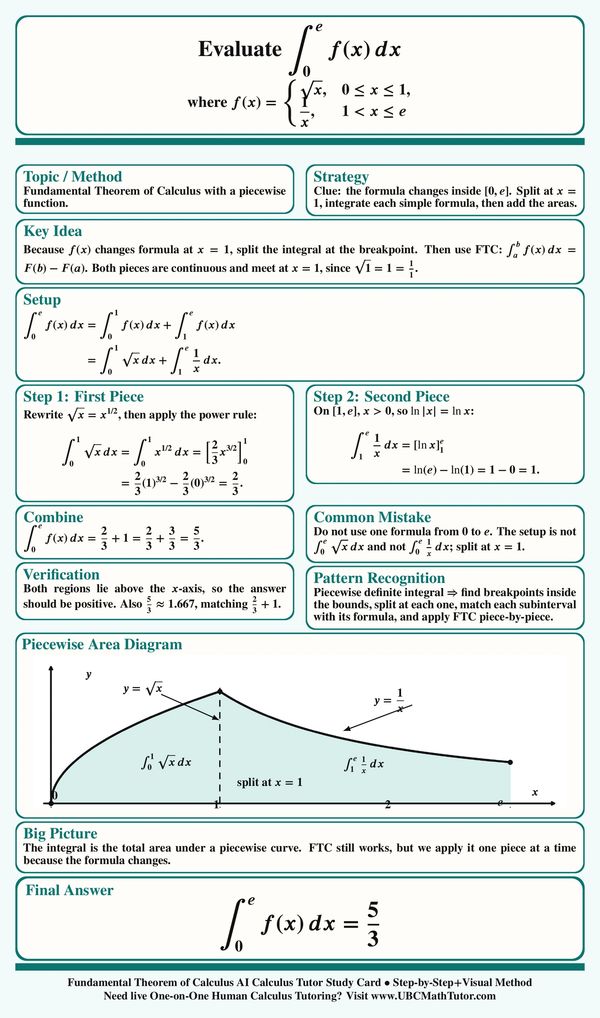
FTC Definite Integral with a Piecewise Function
This MathGPT tutor study card explains how to evaluate a definite integral when the function formula changes inside the interval. The method splits the integral at the breakpoint, applies the correct formula on each subinterval, evaluates both pieces with the FTC, and adds the areas.
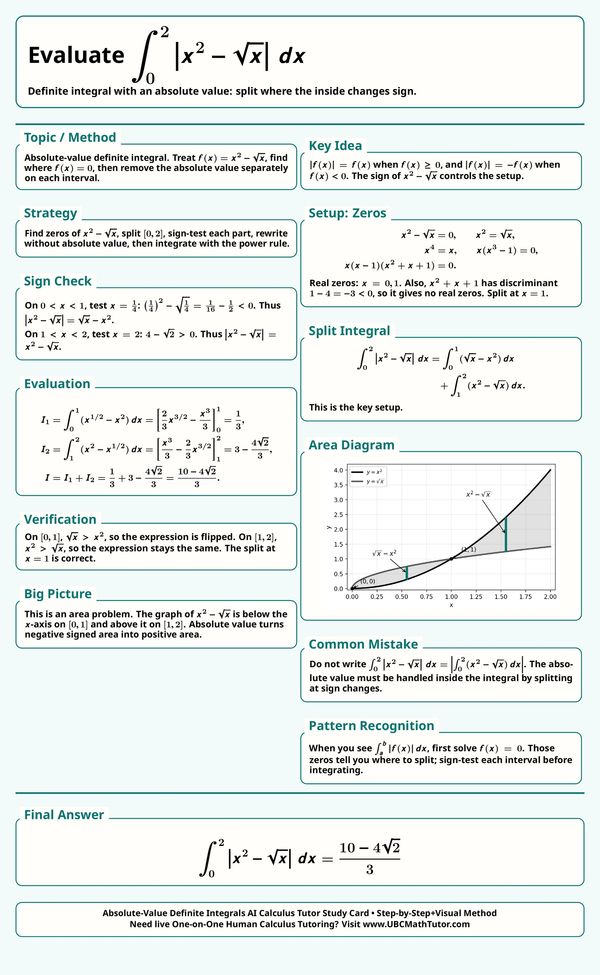
Absolute-Value Definite Integral with a Split Point
This AI Calc tutor study card explains how to evaluate a definite integral with an absolute value by finding where the inside expression changes sign. The method solves for the zero, splits the interval, rewrites each piece without absolute value bars, and adds the positive areas.
Reza's Caclulus GPT tutor Study Card Gallery 8
FTC Accumulation Word Problem
This AI Calculus tutor study card explains how to solve an accumulation word problem using the Fundamental Theorem of Calculus. The solution starts with the initial oil volume, integrates the rate of change over time, sets the result equal to the target volume, and rejects the negative time value.
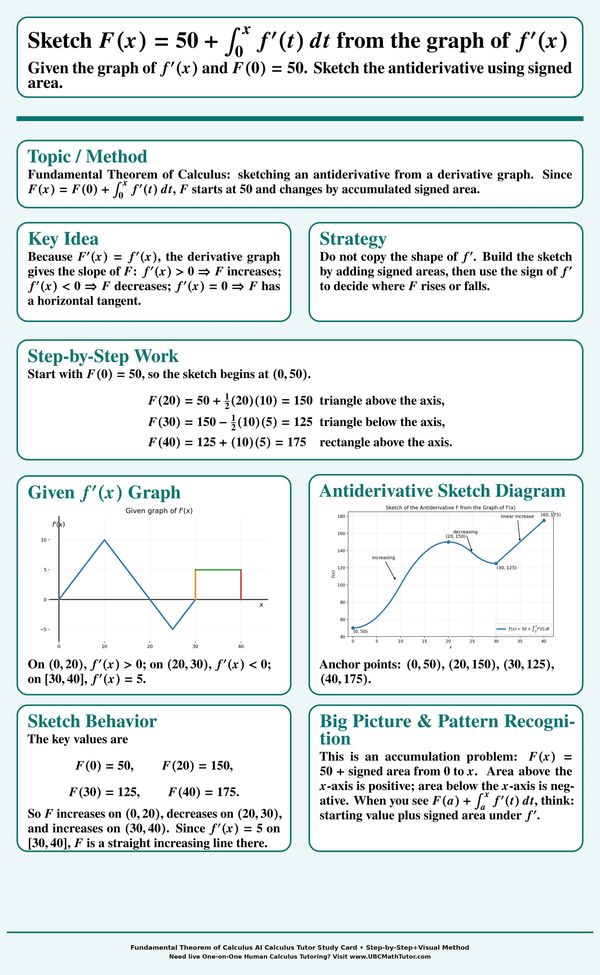
Sketch an Antiderivative from a Derivative Graph
This MathGPT tutor study card explains how to sketch an antiderivative from the graph of its derivative using signed area. The method starts from the given initial value, adds area above the x-axis, subtracts its area below the x-axis, and uses the sign of the derivative to decide where the function increases or decreases.
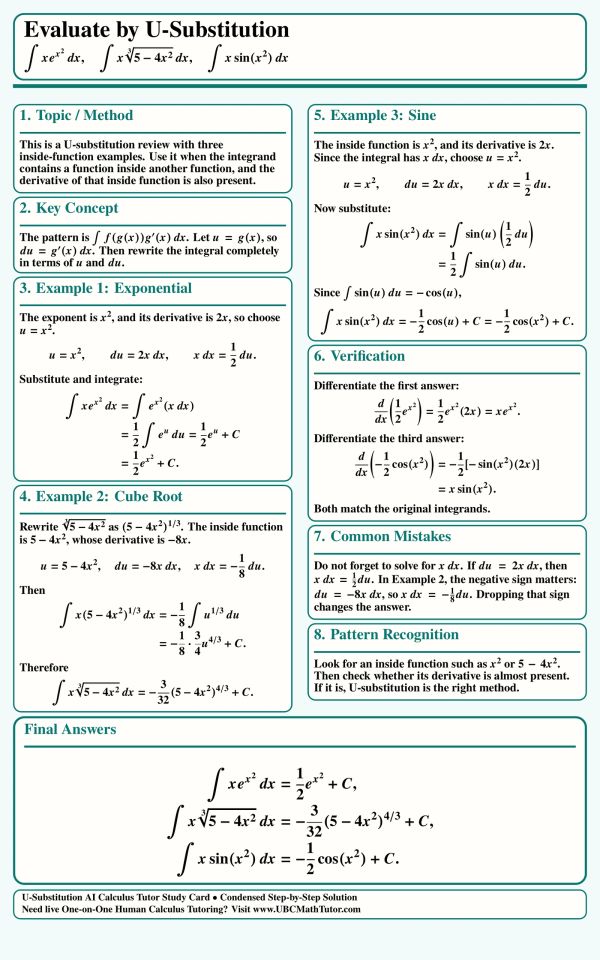
U-Substitution with 3 Examples
This AI Calc tutor study card reviews U-substitution through three classic examples: an exponential integral, a cube-root integral, and a sine integral. It shows how to spot the inside function, match its derivative, rewrite x dx correctly, and finish each antiderivative step by step.
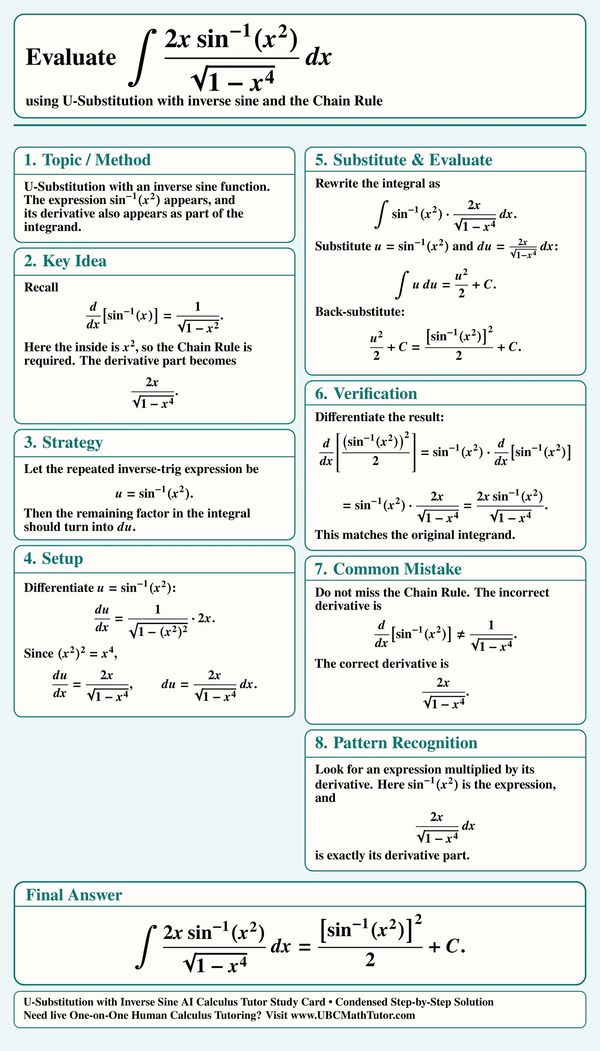
U-Substitution with Inverse Sine
This AI Calculus tutor study card shows how to integrate an expression involving arcsin(x^2) by using U-substitution and the Chain Rule. It explains why u = sin^(-1)(x^2) works, how the remaining factor becomes du, and how to verify the final answer cleanly.
Linear U-Substitution Shortcuts
This MathGPT tutor study card explains linear U-substitution shortcuts for a sum of standard integrals, including exponential, sine, logarithmic, power, radical, and secant-squared terms. It shows when to divide by the coefficient of the inside linear function and how to integrate the expression term by term.

Exponential U-Substitution Examples
This AI Calc tutor study card reviews exponential U-substitution through several common integral patterns. It explains how to spot an inside exponential function, rewrite non-e bases, handle square-root exponents, and recognize a derivative-over-function logarithm pattern.
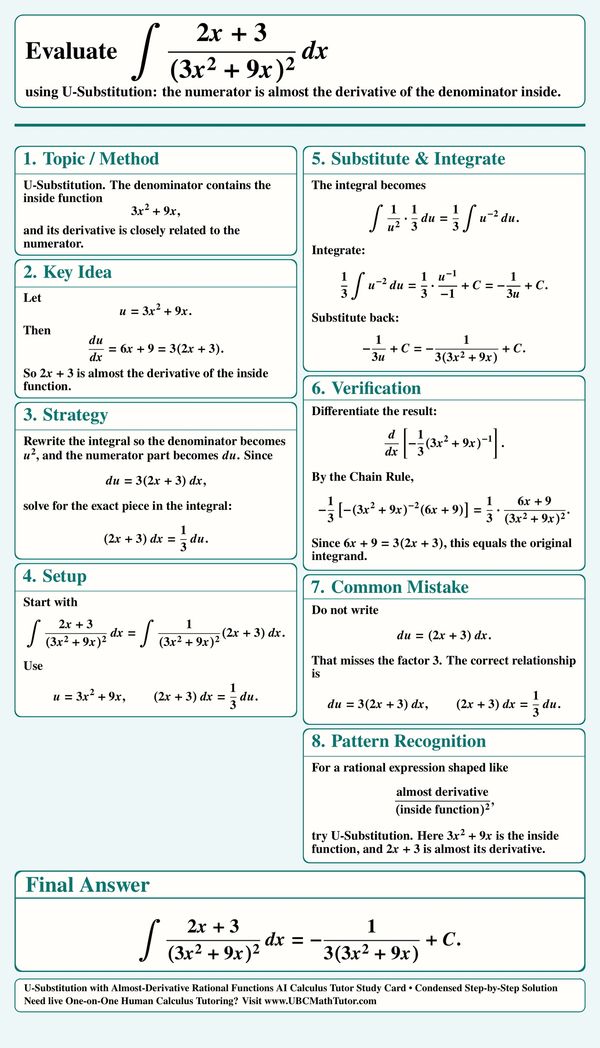
U-Substitution Tricky Example
This AI Calculus tutor study card explains how to use U-substitution when the numerator is almost the derivative of the denominator’s inside function. The example shows how to account for the missing constant factor, rewrite the integral in u, and verify the answer with the Chain Rule.
Definite Integral by U-Substitution
This MathGPT tutor study card shows how to evaluate a definite integral using U-substitution with changed bounds. The key step is choosing u equals x squared so the radical becomes an inverse sine form, then using the new limits to finish the integral cleanly.
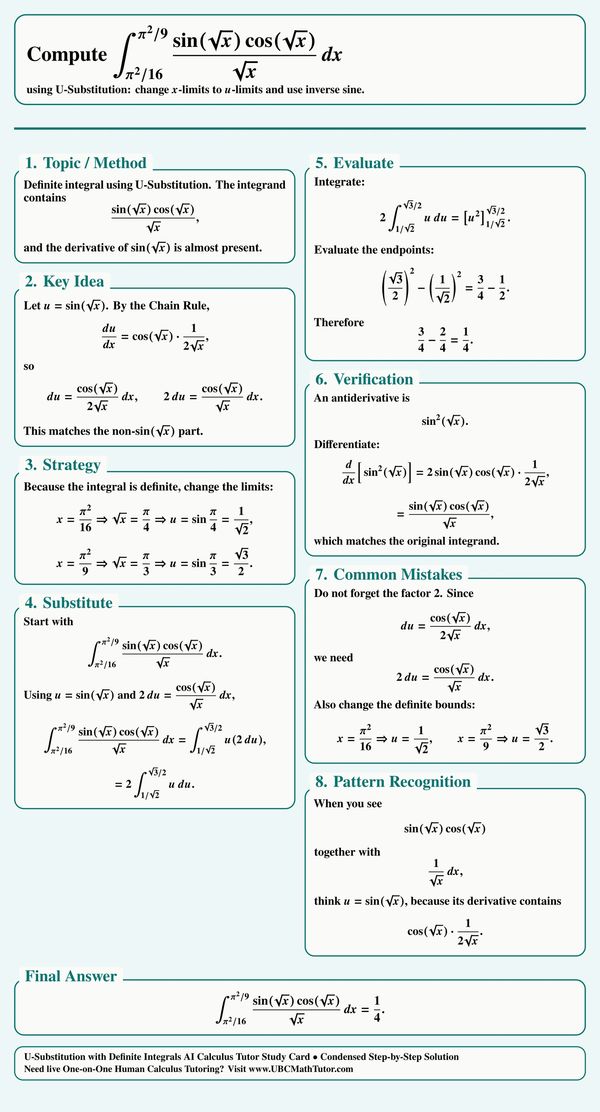
Definite U-Substitution with Sine and Cosine
This Calculus GPT tutor study card explains how to evaluate a definite integral using U-substitution when sine of square root x and cosine of square root x appear together. The solution changes the x-limits to u-limits, tracks the Chain Rule factor, and finishes the integral with a simple power rule.
-tanx-integ.png/:/cr=t:0%25,l:0%25,w:100%25,h:100%25/rs=w:600,cg:true)
Logarithmic Trig U-Substitution
This AI Calc tutor study card explains how to integrate tangent x times natural log of cosine x using U-substitution. The key is choosing the logarithm as u, recognizing that tangent x is the negative derivative part, and keeping the sign correct in the final antiderivative.
Algebraic Power U-Substitution
This AI Calculus tutor study card shows how to integrate one plus square root x raised to a high power by rewriting the differential fully in terms of u. The method turns the expression into a polynomial integral, expands the remaining factor, and substitutes back cleanly.
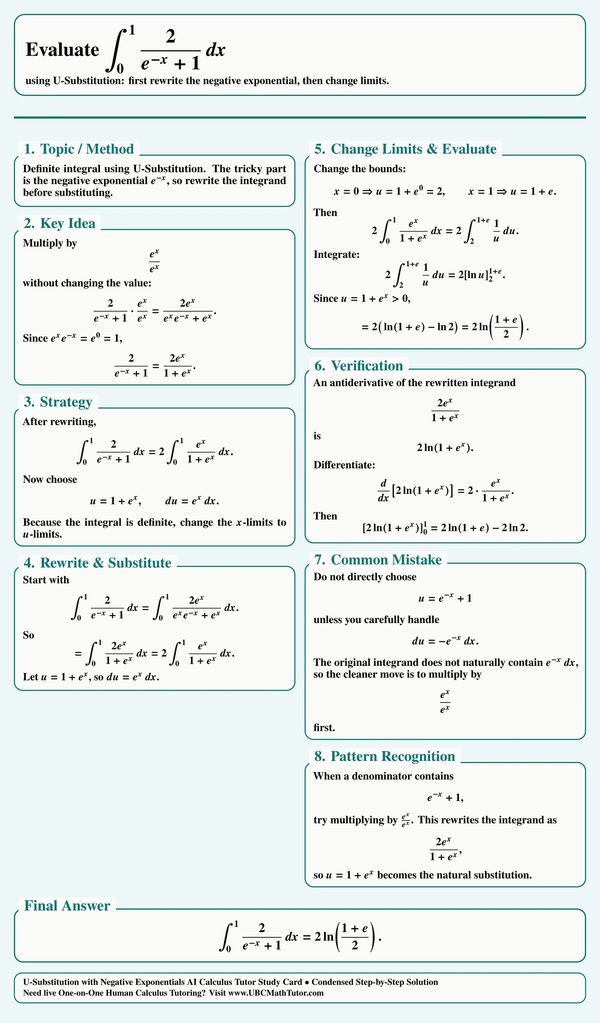
Definite U-Substitution with Negative Exponential
This Calculus GPT tutor study card explains how to evaluate a definite integral with a negative exponential in the denominator. The method rewrites the integrand by multiplying by e to the x, chooses u equals one plus e to the x, changes the bounds, and finishes with a logarithm.
Reza's AI Calc tutor Study Card Gallery 9
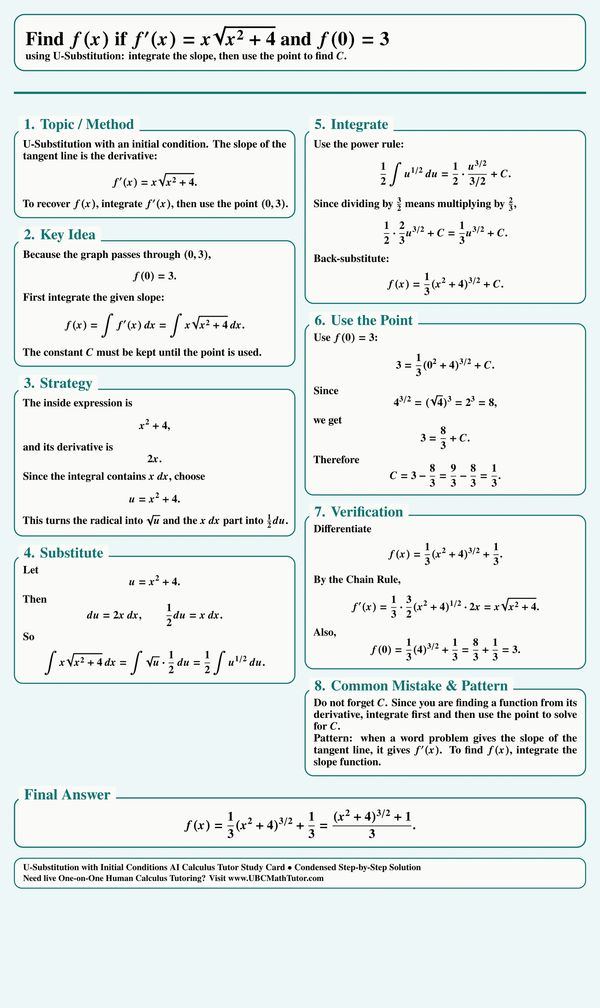
U-Substitution with an Initial Condition
This AI Calc tutor study card shows how to find a function from its derivative by integrating first and then using an initial condition. The example uses u-substitution on the slope function, keeps the constant of integration, and plugs in the point f of zero equals 3 to solve for C.
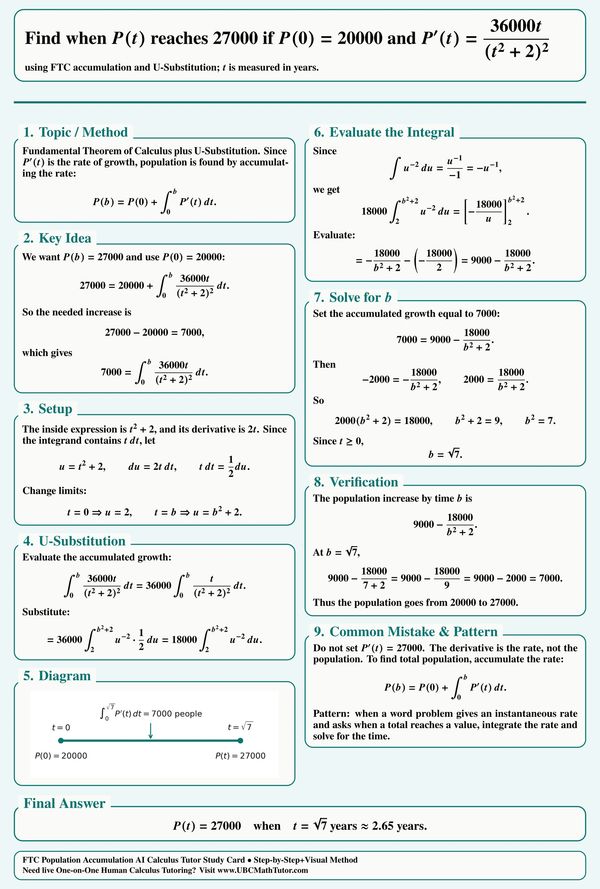
Population Accumulation with U-Substitution
This AI Calculus tutor study card explains how to solve a population accumulation word problem using the Fundamental Theorem of Calculus and U-substitution. The solution integrates the rate of change, sets the accumulated growth equal to the needed increase, and solves for the time.

One-on-One Attention
I provide individualized attention to each of my students, so they can get the support and guidance they need to succeed. I am patient, understanding, and committed to helping my students reach their full potential.
